Contents
- 1 Why Are AI Chatbots Taking Over WordPress Websites?
- 2 What Is an AI Chatbot for WordPress?
- 3 What Is WPBot?
- 3.1 Key features include:
- 3.2 1. AI-Powered Chatbot (ChatGPT Integration)
- 3.3 2. Train AI Using Your Website Content
- 3.4 3. Lead Generation & Email Capture
- 3.5 4. WooCommerce Integration
- 3.6 5. FAQ & Automated Customer Support
- 3.7 6. Multilingual Support
- 3.8 7. Conversational Forms (Drag-and-Drop)
- 3.9 8. Live Human Chat Handoff
- 3.10 9. Chat Analytics & Performance Insights
- 3.11 10. Omnichannel Messaging
- 3.12 11. Website Retargeting & Exit-Intent Messages
- 3.13 12. Fully Customizable Chatbot
- 4 How Do AI Chatbots Work on WordPress?
- 5 What Problems Do AI Chatbots Solve for WordPress Sites?
- 6 How AI Chatbots Increase Revenue
- 7 Real Use Cases of AI Chatbots on WordPress
- 8 What Features Should a WordPress Chatbot Have?
- 9 How WPBot Stands Out Among WordPress Chatbots
- 10 Easy Setup
- 11 How to Add an AI Chatbot to WordPress (Step-by-Step)
- 12 Common Mistakes When Implementing Chatbots
- 13 The Future of AI Chatbots on WordPress
- 14 Frequently Asked Questions (FAQ)
- 15 Final Thoughts
AI chatbots are rapidly becoming one of the most powerful tools for WordPress websites in 2026.
Instead of static pages and slow customer support, modern websites now use AI chatbots to:
- Answer customer questions instantly
- Guide visitors through the website
- Recommend products and services
- Capture leads automatically
- Increase conversions and sales
For WordPress users, tools like WPBot make it possible to add these capabilities without coding.
In simple terms:
AI chatbots turn WordPress websites into interactive assistants that help visitors, generate leads, and drive revenue — 24/7.
In this guide, we’ll cover everything you need to know, including:
- What AI chatbots are
- Why they are exploding in 2026
- How they work on WordPress
- Real business use cases
- How WPBot powers AI chat experiences
- How to implement chatbots correctly
If you run a WordPress site, understanding this technology is now essential.
Why Are AI Chatbots Taking Over WordPress Websites?
Several major changes in technology and user behavior are driving the rapid growth of AI chatbots.
Let’s break them down.
1. Users Expect Instant Answers
Modern users do not want to:
- search through menus
- read long documentation
- wait hours for email replies
They want instant responses.
AI chatbots solve this problem by providing:
- real-time answers
- guided navigation
- automated support
This dramatically improves user experience.
2. Websites Are Becoming Interactive
Traditional websites were designed around pages and menus.
Today, many websites are moving toward conversation-based experiences.
Visitors simply ask:
- “How does your product work?”
- “What plan should I choose?”
- “Do you offer refunds?”
The chatbot responds immediately.
This makes websites feel more like apps or assistants.
3. AI Technology Has Improved Dramatically
Large AI models can now:
- understand context
- interpret natural language
- generate accurate answers
- remember conversation history
This allows chatbots to provide human-like responses.
What Is an AI Chatbot for WordPress?
An AI chatbot is a conversational interface embedded into a website that allows visitors to communicate using natural language.
Instead of navigating through pages, users simply ask questions.
Example interaction:
Visitor asks:
“Which product is best for beginners?”
The chatbot analyzes the question and provides a helpful answer instantly.
On WordPress websites, chatbots can connect to:
- blog content
- product databases
- knowledge bases
- documentation
- support resources
This allows them to provide accurate, context-aware responses.
What Is WPBot?
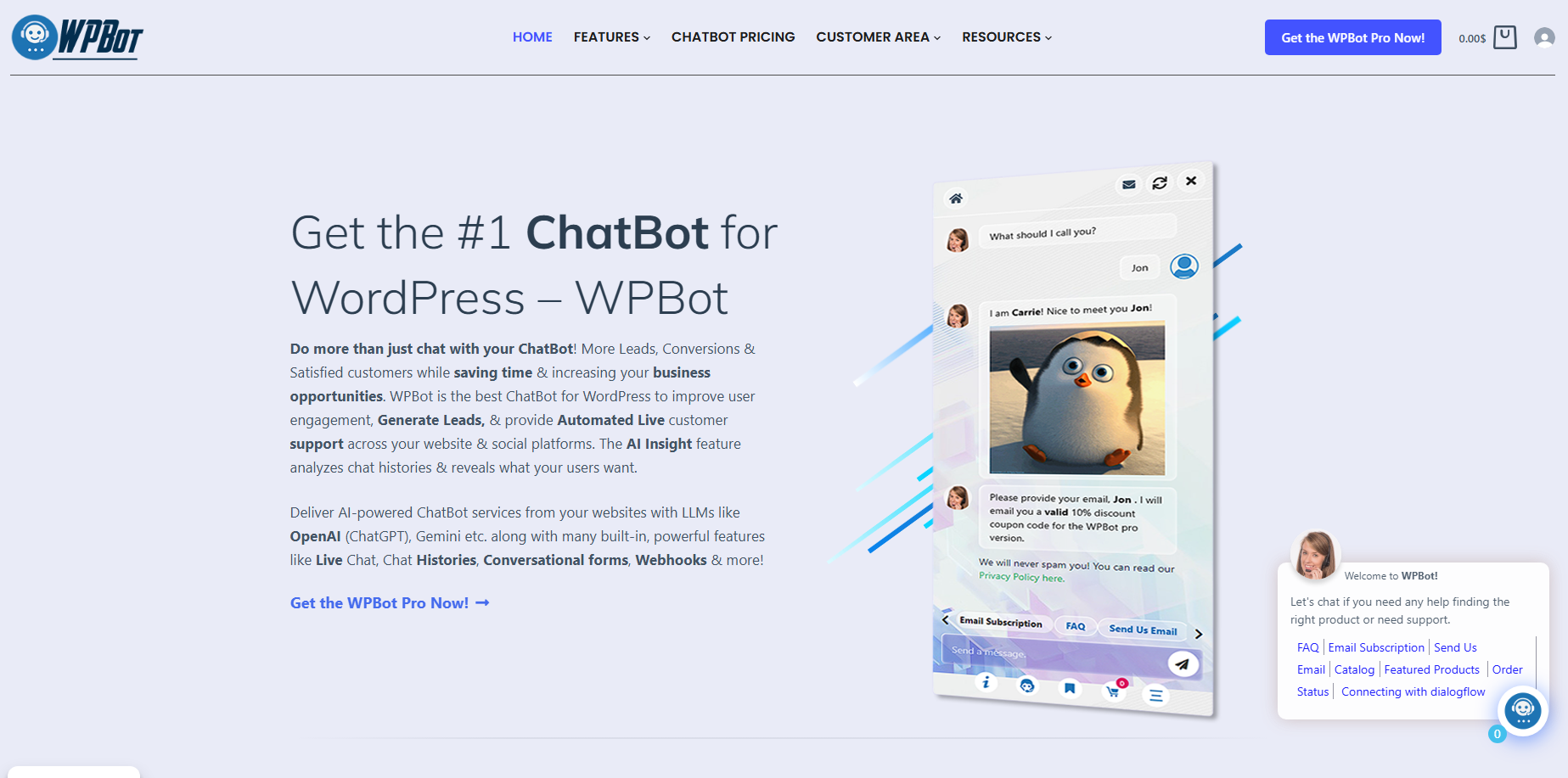 Meet One of the Most Popular Chatbot Solutions for WordPress
WPBot is a powerful WordPress AI chatbot plugin designed to help websites automate customer interaction.
It allows website owners to create AI-powered chat experiences directly inside WordPress.
Unlike many external chatbot platforms, WPBot integrates deeply with the WordPress ecosystem.
This makes it ideal for:
- WooCommerce stores
- business websites
- SaaS products
- membership sites
- service businesses
Core Capabilities of WPBot
WPBot provides several important capabilities for modern websites.
Key features include:
1. AI-Powered Chatbot (ChatGPT Integration)
WPBot integrates with AI models so the chatbot can answer questions automatically.
Capabilities include:
- Integration with AI providers like OpenAI and other models
- Automatic answers based on website content
- Natural language conversations with visitors
- AI training using website pages, posts, or documents
This allows websites to provide 24/7 automated customer support.
2. Train AI Using Your Website Content
WPBot can learn directly from your site.
Training methods include:
- RAG vector database embedding
- Fine-tuning with site data
- Uploading PDFs, CSVs, or sitemaps
The chatbot can then answer visitors with links to relevant pages on your website.
3. Lead Generation & Email Capture
WPBot helps convert visitors into leads.
Key lead generation tools:
- Conversational forms
- Email collection for newsletters
- Phone number capture
- Callback requests
- Lead qualification questions
This helps businesses capture leads before visitors leave the website.
4. WooCommerce Integration
For online stores, WPBot integrates deeply with WooCommerce.
Store features include:
- Show product catalog inside chat
- Display featured or sale products
- Check order status
- Add products to cart from chat
This turns the chatbot into a sales assistant for WooCommerce stores.
5. FAQ & Automated Customer Support
WPBot can instantly answer common questions (FAQ).
Examples:
- Pricing information
- Service details
- Delivery or refund policy
- Product questions
It reduces support workload and response time by providing instant automated answers.
6. Multilingual Support
WPBot works with almost any language.
Features include:
- Multi-language chatbot responses
- RTL language support
- Compatibility with translation plugins
This helps websites serve international customers easily.
7. Conversational Forms (Drag-and-Drop)
WPBot includes a conversational form builder.
You can create:
- Contact forms
- Lead capture forms
- Surveys
- Job applications
- Booking forms
These forms work inside the chat window to make user interaction more engaging.
8. Live Human Chat Handoff
If the bot cannot solve a problem, users can switch to a human.
Features:
- Live chat takeover
- Slack integration
- Support via WordPress dashboard
This creates a hybrid AI + human support system.
9. Chat Analytics & Performance Insights
WPBot tracks how visitors interact with the chatbot.
Analytics include:
- Chat history logs
- Export chats as CSV
- Reports on liked/disliked responses
- AI insights about customer questions
This helps businesses improve chatbot performance over time.
10. Omnichannel Messaging
WPBot can connect with multiple messaging platforms.
Supported channels include:
This allows businesses to manage customer conversations across platforms.
11. Website Retargeting & Exit-Intent Messages
WPBot can display targeted messages based on user behavior.
Examples:
- Exit-intent offers
- Discount coupons
- Special announcements
- Newsletter signup prompts
These features help reduce bounce rate and increase conversions.
12. Fully Customizable Chatbot
You can easily customize the chatbot to match your brand.
Customization options:
- Custom icons and colors
- Floating chatbot widget
- Shortcodes to embed chatbot anywhere
- Greeting messages and start menu
This allows WordPress websites to operate with automated support and marketing systems.
How Do AI Chatbots Work on WordPress?
Understanding the basic architecture helps explain why chatbots are so powerful.
Key Components of a WordPress Chatbot
|
Component |
Description |
|
Chat Interface |
The chat window users interact with |
|
AI Engine |
Processes user questions |
|
Knowledge Base |
Website content and data |
|
Integration Layer |
Connects chatbot to WordPress |
|
Automation System |
Handles actions like lead capture |
Example Chatbot Interaction Flow
Here is what happens when a visitor interacts with a chatbot:
- A visitor opens the chat widget
- They ask a question
- The chatbot analyzes the intent
- It searches available knowledge sources
- AI generates a response
- The answer appears instantly
Advanced chatbots can also:
- recommend products
- capture leads
- send users to specific pages
- trigger automated workflows
What Problems Do AI Chatbots Solve for WordPress Sites?
Many websites struggle with similar problems.
AI chatbots directly address these challenges.
Problem 1: Slow Customer Support
Customer support teams often struggle with repetitive questions.
Examples include:
- shipping policies
- pricing details
- account access
- refund policies
AI chatbots can automatically answer these questions.
This significantly reduces support workload.
Problem 2: Visitors Cannot Find Information
Users often leave websites because they cannot find what they need.
A chatbot solves this by acting as a website guide.
Visitors simply ask:
- “Where is your pricing page?”
- “How do I contact support?”
The chatbot directs them instantly.
Problem 3: Low Conversion Rates
Visitors often hesitate before making decisions.
AI chatbots help by providing:
- product explanations
- plan comparisons
- recommendations
This reduces decision friction.
How AI Chatbots Increase Revenue
AI chatbots are not just support tools.
They can also directly increase revenue.
1. Automated Lead Generation
Chatbots can collect leads through conversation.
Example flow:
Visitor asks about services.
The chatbot responds:
“Would you like a free consultation?”
If the user agrees, the chatbot collects:
- name
- requirements
This information can be sent to CRM systems automatically.
2. Product Recommendations
Chatbots can suggest products based on user intent.
Example:
Visitor asks:
“I need an affordable laptop.”
The chatbot recommends suitable products.
This improves sales opportunities.
3. Cart Abandonment Reduction
Cart abandonment is a major problem for online stores.
Chatbots can help by:
- answering checkout questions
- offering discounts
- assisting with payment issues
This improves checkout completion rates.
Real Use Cases of AI Chatbots on WordPress
Different industries use chatbots in different ways.
Here are some common examples.
eCommerce Stores
WooCommerce websites benefit greatly from chatbots.
Typical use cases include:
- product search
- order tracking
- product recommendations
- shipping questions
Chatbots help shoppers find products faster.
SaaS Companies
Software companies use chatbots for:
- product demos
- onboarding guidance
- pricing explanations
- customer support
This reduces the burden on sales teams.
Service Businesses
Consultants and agencies use chatbots to:
- qualify leads
- answer service questions
- schedule consultations
This turns website traffic into business opportunities.
Educational Platforms
Education websites use chatbots for:
- course recommendations
- student onboarding
- admission questions
- technical support
Membership Communities
Chatbots can help members with:
- account access
- billing issues
- platform navigation
What Features Should a WordPress Chatbot Have?
Not all chatbot plugins are equal.
In 2026, the best chatbots include several key capabilities.
Natural Language Processing
The chatbot should understand natural questions.
Users should be able to type normally instead of selecting menus.
Knowledge Base Training
The chatbot should learn from:
- blog posts
- documentation
- FAQs
This improves answer accuracy.
WooCommerce Integration
For online stores, chatbots should be able to:
- search products
- display product details
- recommend items
- assist checkout
Lead Generation Tools
The chatbot should be able to:
- collect visitor information
- integrate with email marketing tools
- send leads to CRM systems
Multilingual Support
Modern websites serve global audiences.
Chatbots should support multiple languages.
How WPBot Stands Out Among WordPress Chatbots
Many chatbot tools exist.
However, WPBot offers several advantages for WordPress users.
Deep WordPress Integration
Unlike external platforms, WPBot works directly inside WordPress.
This provides:
- better compatibility
- easier setup
- improved performance
Built-In WooCommerce Support
For eCommerce sites, WPBot can:
- search products
- recommend items
- show product details
- assist customers during shopping
AI + Rule-Based Hybrid System
WPBot combines:
- rule-based automation
- AI-powered responses
This allows both predictable workflows and intelligent conversations.
Easy Setup
Most WordPress users can install and configure WPBot without coding.
Typical setup time is under 30 minutes.
How to Add an AI Chatbot to WordPress (Step-by-Step)
Adding a chatbot to WordPress is simpler than many people expect.
Step 1: Install a Chatbot Plugin
Install a chatbot plugin such as WPBot from the WordPress dashboard.
Step 2: Configure the Chat Interface
Customize:
- chatbot name
- greeting messages
- appearance
- triggers
Step 3: Train the Chatbot
Provide data sources such as:
- FAQs
- blog posts
- documentation
- product pages
Step 4: Set Conversation Flows
Define how the chatbot handles tasks like:
- support queries
- lead capture
- product discovery
Step 5: Test and Optimize
Test common scenarios including:
- customer questions
- checkout assistance
- navigation help
Fix inaccurate responses.
Common Mistakes When Implementing Chatbots
Many websites fail to use chatbots effectively.
Avoid these mistakes.
1. Poor Training Data
AI chatbots need accurate knowledge sources.
Without training data, responses may be generic.
2. Over-Automation
Not every situation should be automated.
Provide an option to contact a human.
3. Long Chatbot Responses
Chatbot answers should be:
- short
- clear
- helpful
Avoid long paragraphs.
4. Ignoring Analytics
Chatbot analytics reveal valuable insights such as:
- common user questions
- product interest
- support trends
Use this data to improve your website.
The Future of AI Chatbots on WordPress
AI chatbots will continue evolving rapidly.
Here are some trends already emerging.
Voice Chatbots
Users will interact using voice instead of text.
Multimodal AI
Future chatbots will understand:
- images
- voice
- text
- documents
Autonomous AI Agents
Advanced chatbots will complete actions such as:
- placing orders
- scheduling appointments
- submitting support tickets
Conversational Websites
The traditional page-based website may gradually shift toward conversation-based interfaces.
Visitors will simply ask for what they need.
Frequently Asked Questions (FAQ)
Are AI chatbots expensive for WordPress?
Costs vary depending on features and usage.
Many chatbot plugins offer affordable plans for small businesses.
Can AI chatbots replace human support?
No.
They automate common questions but complex issues still require human assistance.
Are chatbots useful for small websites?
Yes.
Even small websites benefit from automated support and lead generation.
Do AI chatbots work with WooCommerce?
Yes.
Many chatbots, including WPBot, integrate directly with WooCommerce to assist shoppers.
Will AI chatbots slow down my website?
Most chatbot systems operate on external servers, so they usually have minimal impact on site speed.
Final Thoughts
AI chatbots are reshaping how WordPress websites interact with visitors.
Instead of passive pages, websites can now provide:
- instant answers
- guided navigation
- automated support
- personalized recommendations
- lead generation
Tools like WPBot make it possible for WordPress site owners to deploy these capabilities without complex development.
As AI technology continues advancing, chatbots will likely become a standard feature of modern websites.
For businesses using WordPress, adopting AI chatbots early can provide a major advantage in:
- customer experience
- conversion optimization
- support automation
- revenue growth
In the coming years, the most successful websites will not just publish content.
They will converse with visitors, guide them, and help them make decisions.
AI chatbots are making that future possible today.