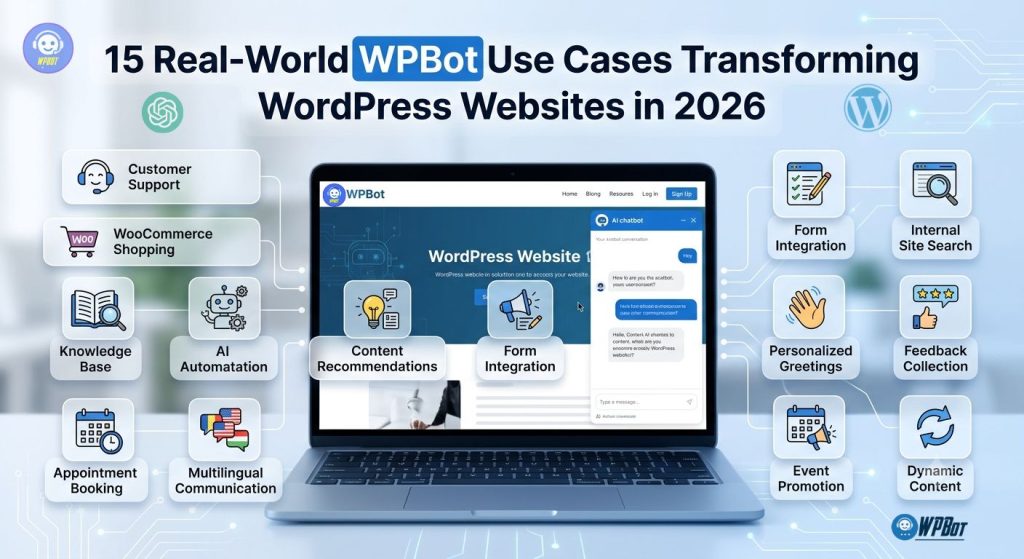
Why Are More Businesses Using AI Chatbots in 2026?
Customer expectations have changed.
People no longer want to wait hours—or even minutes—for answers. They expect instant responses, personalized recommendations, and support whenever they visit your website.
That creates a challenge for small businesses:
- Hiring more support staff is expensive.
- Answering the same questions repeatedly wastes time.
- Missing a visitor often means losing a potential customer.
This is where AI chatbots like WPBot make a difference.
Instead of replacing human support, WPBot handles repetitive conversations automatically, allowing your team to focus on more complex customer needs.
Today, AI chatbots are commonly used for:
- Customer support
- Product recommendations
- Lead generation
- Appointment booking
- Order tracking
- Knowledge base search
- Content discovery
- Internal employee assistance
- Multilingual communication
- Sales automation
The result? Better customer experiences, higher conversion rates, and lower operating costs.
What Is WPBot?
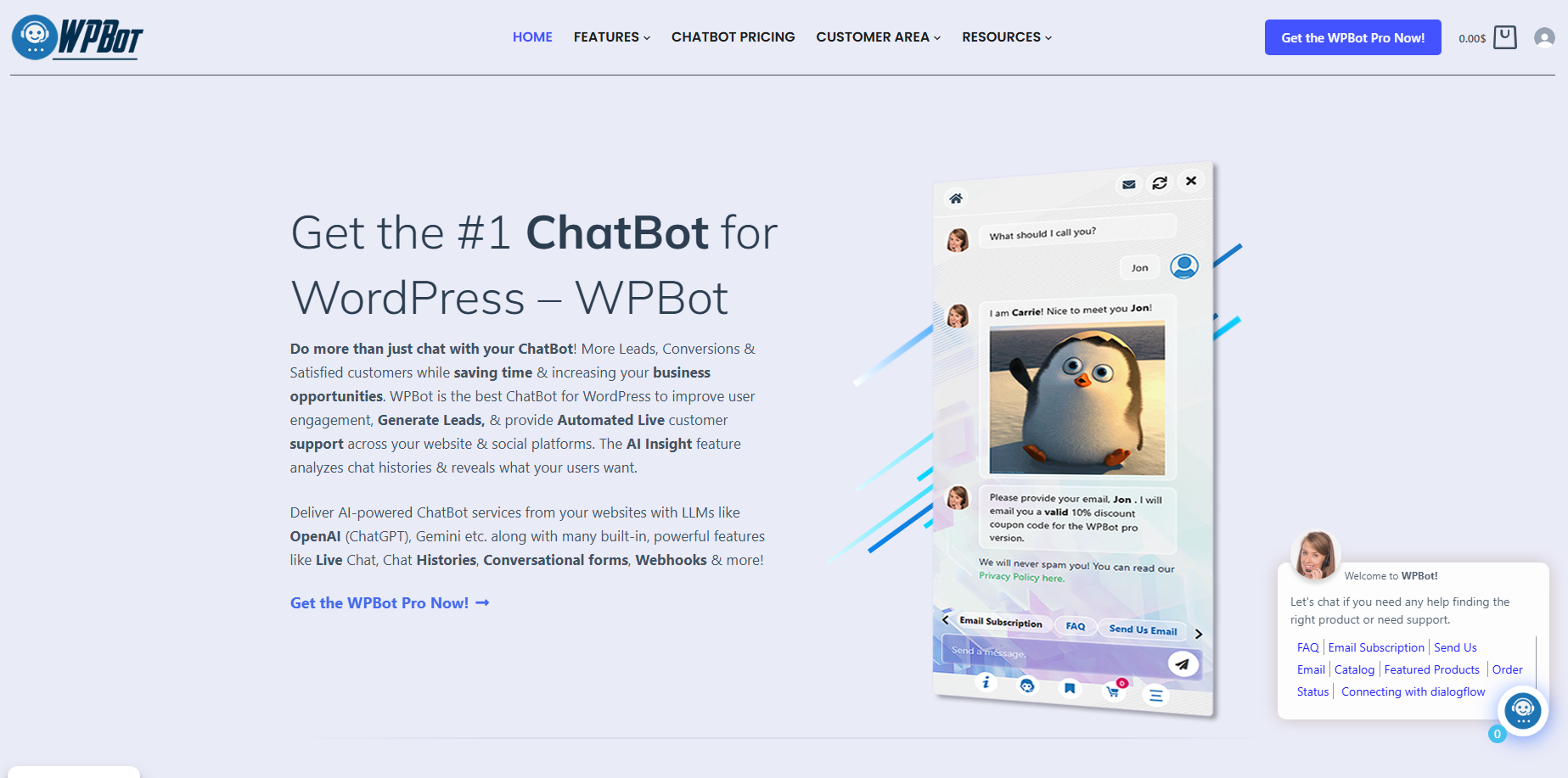
Unlike many chatbot platforms that require third-party services, WPBot is built specifically for WordPress and integrates with popular plugins and services.
Depending on your configuration, WPBot can:
- Answer FAQs automatically
- Search your website content
- Recommend products
- Collect leads
- Connect with ChatGPT or other AI models
- Search a knowledge base
- Support WooCommerce customers
- Escalate conversations to human agents
- Operate 24/7
This makes it suitable for businesses of every size—from bloggers to enterprise websites.
Why Is WPBot Becoming Essential in 2026?
The AI landscape has changed dramatically.
Website visitors now expect conversations that feel natural rather than scripted. Modern AI can understand intent instead of relying only on keyword matching.
WPBot combines multiple technologies to provide:
- AI-generated answers
- Website knowledge search
- Product search
- Smart automation
- Live chat integrations
- AI training from your own content
Instead of building hundreds of chatbot rules manually, businesses can train WPBot using their existing website content. That saves significant setup time while improving answer quality.
How Does WPBot Improve the Customer Journey?
Think about a typical visitor. They arrive from Google. They have one question. If they can’t find the answer quickly, they’ll probably leave.
WPBot changes this experience. Instead of searching through multiple pages, visitors simply ask a question and receive an immediate response. This keeps users engaged and reduces frustration.
| Without WPBot | With WPBot |
|---|---|
| Visitor searches manually | Visitor asks a question |
| Reads multiple pages | Gets an instant answer |
| May leave confused | Receives guided assistance |
| Support team handles repetitive tickets | AI resolves common questions |
| Slower purchasing decisions | Faster purchase decisions |
1. 24/7 AI Customer Support
The Challenge
Customers visit websites at all hours. If your support team works only during business hours, many visitors never receive immediate help. This can result in lost sales, frustrated customers, increased bounce rates, and more abandoned carts.
How WPBot Helps
WPBot provides instant responses around the clock. It can answer questions like:
- What are your business hours?
- How much does shipping cost?
- Do you offer refunds?
- Where is my order?
- Which pricing plan should I choose?
Visitors receive immediate assistance—even at midnight.
Real-World Example
Imagine an online electronics store. A customer visits at 2:00 AM and asks: “Does this laptop support Windows 11?” Instead of waiting until morning, WPBot instantly searches the product information and responds. The customer completes the purchase immediately. Without the chatbot, that sale might have been lost.
Benefits
- Lower support workload
- Faster response times
- Better customer satisfaction
- Increased conversions
- Global customer support
2. Intelligent Product Recommendations
Many online stores overwhelm visitors with too many choices. Customers often don’t know where to begin. WPBot acts like a digital shopping assistant.
The chatbot can recommend products based on:
- Budget
- Category
- Features
- Brand
- Compatibility
- Popularity
Why This Matters
Personalized recommendations often lead to larger average order value, more cross-selling, a better customer experience, and faster buying decisions.
Best Fit For
WooCommerce stores, fashion websites, electronics stores, furniture retailers, bookstores, and digital product shops.
3. Automated Lead Generation
Every website needs leads. Unfortunately, many visitors leave without contacting you. WPBot helps capture those missed opportunities by starting a conversation instead of just displaying a static “Contact us” form.
The lead is then stored in WordPress or sent directly to your CRM.
Why It Works
Conversations feel less intimidating than traditional forms. People are more willing to answer simple questions one at a time.
Example
A digital agency receives 150 monthly inquiries. After implementing WPBot, qualified leads increase because visitors receive guidance before submitting their details.
Benefits
- Higher lead conversion
- Better qualification
- Reduced form abandonment
- Automated follow-up opportunities
4. WooCommerce Order Tracking
One of the most common support requests is “Where is my order?” Support agents answer this question countless times. WPBot automates the process.
How It Works
Customers provide their order number and email address, and WPBot retrieves the order status from WooCommerce. Possible responses include:
- Processing
- Shipped
- Out for delivery
- Delivered
Benefits
- Saves support time
- Improves customer satisfaction
- Provides instant updates
- Reduces repetitive tickets
Real Example
A WooCommerce store handling hundreds of daily orders can eliminate dozens—or even hundreds—of repetitive support requests simply by automating order tracking through WPBot.
5. AI-Powered Knowledge Base Search
Documentation often contains hundreds of articles. Finding the right one isn’t always easy. Visitors may search using different words than your article titles, and traditional search struggles with this. WPBot improves the experience.
WPBot understands the user’s intent and recommends the correct documentation, even if the phrasing doesn’t match the title perfectly.
Ideal For
SaaS companies, software plugins, hosting providers, educational websites, technical documentation, and product manuals.
Benefits
- Faster documentation discovery
- Lower support costs
- Better customer success
- Improved user experience
6. AI Appointment Booking and Scheduling
Why Do Businesses Lose Appointments?
Many service-based businesses miss opportunities simply because visitors can’t book an appointment immediately. Imagine someone visiting your website at 10:30 PM. They’re ready to schedule a consultation, but your office is closed. If they have to wait until morning, there’s a good chance they’ll move on to a competitor. That’s where WPBot comes in.
How WPBot Helps
WPBot can guide visitors through the booking process step by step by doing the following:
- Answer questions about your services
- Check available appointment options
- Collect booking information
- Connect with popular scheduling plugins
- Send booking confirmations
- Reduce back-and-forth emails
Best Industries
Appointment booking works especially well for medical clinics, dentists, lawyers, marketing agencies, consultants, coaches, fitness trainers, beauty salons, repair services, and real estate agencies.
Benefits
- More appointments
- Fewer missed opportunities
- Less manual scheduling
- Better customer experience
- Higher conversion rates
7. Multilingual Customer Support
Why Is Multilingual Support Important in 2026?
Businesses are no longer limited to local customers. Even a small WooCommerce store may receive visitors from all over the globe. Hiring support agents for every language isn’t realistic for most businesses. AI changes that.
How WPBot Helps
With AI integration, WPBot can communicate with customers in multiple languages. Visitors simply type in their preferred language, and the chatbot responds naturally.
No manual language selection is required; the AI automatically detects and switches to the correct language flow.
Benefits
- Expand into international markets
- Improve customer satisfaction
- Reduce translation costs
- Increase global sales
- Deliver consistent support
8. AI Sales Assistant for WooCommerce
What Makes an AI Sales Assistant Different?
Traditional chatbots answer questions. An AI sales assistant actively helps customers make buying decisions. Instead of waiting for visitors to ask questions, WPBot can proactively offer assistance.
For example, if a visitor spends three minutes browsing laptops, WPBot can prompt them: “Looking for a laptop? I can help you compare models.” If the visitor asks, “Which one is best for video editing?” WPBot recommends suitable products based on specifications and customer needs.
Cross-Selling and Upselling
- Cross-Selling: If a customer buys a smartphone, WPBot can recommend a phone case, screen protector, wireless charger, or earbuds.
- Upselling: If a customer selects a Basic Hosting Plan, WPBot suggests a Professional Hosting Plan highlighting daily backups, better performance, and enhanced security.
Benefits
- Higher average order value
- More cross-sales
- Better shopping experience
- Increased customer confidence
- Reduced abandoned carts
9. Student Support for Online Courses and LMS Websites
Why Do Students Need Instant Help?
Online education has grown rapidly. Students often have immediate questions regarding access, certificates, passwords, lesson unlocking, and course suggestions. Waiting hours for support interrupts the learning process.
How WPBot Helps
WPBot provides instant answers using your course documentation, FAQs, knowledge base, and website content.
Ideal For
LearnDash websites, Tutor LMS, LifterLMS, academy websites, coaching platforms, and membership communities.
Benefits
- Better student satisfaction
- Lower support workload
- Faster onboarding
- Improved course completion rates
10. Internal Employee Help Desk
AI Isn’t Just for Customers
Many businesses use WPBot internally on intranet sites or employee portals. Instead of searching through company documents, employees simply ask questions about leave requests, HR handbooks, password policies, expenses, or onboarding guides.
Internal Knowledge Search
WPBot helps employees locate company policies, Standard Operating Procedures (SOPs), training documents, benefits details, or IT troubleshooting guides.
Benefits
- Faster onboarding
- Improved productivity
- Reduced HR workload
- Consistent information dissemination
- Better employee experience
Bonus Use Case: AI Website Navigation Assistant
Many websites continue to grow over time, adding hundreds of pages, blog posts, products, and resources. As navigation becomes more complex, visitors can struggle to find what they need.
WPBot acts as a smart navigation assistant. Instead of clicking through menus, visitors can ask:
- “Where can I see your pricing?”
- “Do you have tutorials for beginners?”
- “How do I contact sales?”
- “Where are your case studies?”
WPBot directs them to the most relevant page immediately, reducing friction and improving engagement.
Comparison Table: Traditional Support vs. WPBot Automation
| Task | Traditional Website | Website Using WPBot |
|---|---|---|
| Customer support | Business hours only | 24/7 AI assistance |
| Appointment booking | Manual forms and emails | Guided conversational booking |
| Product recommendations | User searches manually | Personalized AI suggestions |
| Language support | Limited or manual | AI-powered multilingual conversations |
| Student support | Email tickets | Instant answers from course content |
| Employee assistance | HR or IT requests | Self-service knowledge search |
Best Practices for These Use Cases
To get the most value from WPBot:
- Train the chatbot with high-quality content: The better your website content, documentation, and FAQs, the better the chatbot’s responses.
- Keep your knowledge base updated: Outdated information leads to inaccurate answers. Review your documentation regularly.
- Combine AI with human support: AI should handle repetitive questions while giving users an easy way to reach a human when needed.
- Monitor chatbot conversations: Review chat logs to discover common customer questions. Use those insights to improve your content and products.
- Start simple: You don’t need to automate everything on day one. Begin with a few high-impact tasks—such as FAQs, product recommendations, and lead capture—and expand as your needs grow.
11. AI Lead Qualification Before Human Sales Takes Over
Why Is Lead Qualification Important?
Not every visitor who contacts your business is ready to buy. Some are just researching, others need technical information, and a few are ready to purchase immediately. Without qualification, your sales team spends valuable time answering introductory questions instead of focusing on high-value opportunities.
How WPBot Qualifies Leads
Instead of asking visitors to fill out a long contact form, WPBot starts a natural conversation asking about business type, employee count, budget, timeline, and key features needed. It gathers this data and passes qualified leads to your sales team or CRM.
Benefits
- Higher-quality leads passed to sales
- Less time spent on unqualified prospects
- Faster sales conversations
- Better customer experience
- Improved conversion rates
12. Smart Content Discovery for Blogs and News Websites
Why Do Readers Leave Too Soon?
Blogs with thousands of articles often suffer because older, helpful posts remain hidden. Traditional search relies on exact keyword matching, which can frustrate readers. WPBot solves this by understanding search intent naturally.
1. Optimizing Checkout Speeds
2. Reducing Cart Abandonment in 2026… [Links]
Benefits
- More page views
- Lower bounce rates
- Longer session duration
- Better internal content discovery
- Increased subscriber engagement
13. Membership Website Assistant
Membership websites receive repetitive questions from subscribers regarding upgrades, premium downloads, passwords, and cancellations. Answering these manually consumes hours of work.
How WPBot Helps
WPBot guides users to the right pages, explains membership benefits, and answers frequently asked questions instantly.
Ideal For
Membership websites, online communities, premium content sites, coaching platforms, subscription businesses, and digital download websites.
Benefits
- Better member satisfaction
- Reduced support requests
- Higher member retention
- Faster member onboarding
- Improved user experience
14. Event Registration and Webinar Support
Events generate a lot of repetitive questions before registration closes, such as start times, pricing, recordings, and Q&A availability.
Registration Assistance
WPBot can guide attendees through the registration process by explaining event details, sharing schedules, collecting registration info, and answering pre-event FAQs.
Best Industries
Online education, SaaS companies, marketing agencies, conferences, community organizations, and product launches.
Benefits
- More event registrations
- Fewer support emails
- Better attendee experience
- Higher event engagement
15. AI Website Concierge
What Is an AI Website Concierge?
Think of the concierge at a luxury hotel. Visitors ask questions, and the concierge guides them to exactly what they need. WPBot performs the same role on your website, directing visitors directly to contact forms, pricing pages, tutorials, or case studies.
Why It Matters
Large websites often overwhelm new visitors. A conversational guide removes friction and makes the experience feel personal, boosting session duration and conversions.
Benefits
- Better website navigation
- Improved user satisfaction
- Longer browsing sessions
- Higher overall conversions
- Lower bounce rates
WPBot Use Cases by Industry
| Industry | Common WPBot Use Cases |
|---|---|
| WooCommerce Stores | Product recommendations, order tracking, cart assistance |
| SaaS Companies | Product demos, knowledge base search, lead qualification |
| Agencies | Lead capture, appointment booking, project inquiries |
| Healthcare | Appointment scheduling, FAQs, patient guidance |
| Education | Student support, course navigation, certificate assistance |
| Membership Sites | Member onboarding, subscription support, premium content guidance |
| Bloggers | Content discovery, article recommendations, newsletter signup |
| Nonprofits | Volunteer inquiries, donation guidance, event information |
| Real Estate | Property inquiries, appointment booking, lead qualification |
| Corporate Websites | Employee help desk, policy search, HR FAQs |
Why WPBot Is More Than Just a Chatbot
Many people still think of chatbots as simple FAQ widgets. That view is outdated. Modern AI-powered chatbots have become digital assistants that help businesses operate more efficiently.
WPBot combines several capabilities into a single platform:
- AI-powered conversations
- Website search
- Knowledge base assistance
- WooCommerce integration
- Lead generation
- Product recommendations
- Live chat escalation
- Multilingual support
- Automation workflows
Rather than replacing your team, WPBot extends it—handling repetitive tasks so your staff can focus on work that requires human expertise.
Best Practices for Getting the Most from WPBot
- Keep Your Content Fresh: AI performs best when it has access to accurate and up-to-date information. Review your documentation, FAQs, and product pages regularly.
- Create Detailed FAQ Pages: Frequently asked questions provide valuable training material for your chatbot while also improving SEO.
- Use Human Handover: Some situations require a real person. Configure WPBot so users can easily contact your support team whenever needed.
- Analyze Chat History: Your chatbot conversations reveal common customer questions, missing documentation, product issues, sales opportunities, and new content ideas. Treat chat logs as customer research.
- Continue Improving: AI chatbots improve over time. Regularly review conversations and update your content based on real user needs.
Frequently Asked Questions (FAQ)
Yes. WPBot can function as a rule-based chatbot with FAQs, search, and predefined responses. Adding AI integration enables more natural, context-aware conversations.
Yes. WPBot integrates with WooCommerce to help customers search products, receive recommendations, check order status, and get answers to common shopping questions.
Absolutely. Small businesses can automate repetitive support tasks, capture leads, and provide 24/7 assistance without hiring additional support staff.
Yes. When integrated with AI language models, WPBot can understand and respond in multiple languages, making it ideal for businesses serving international audiences.
No. WPBot is designed to automate repetitive questions and routine tasks. Complex issues can still be transferred to human agents when needed.
What types of websites benefit most from WPBot?
WPBot is suitable for:
- WooCommerce stores
- Business websites
- SaaS companies
- Educational platforms
- Membership websites
- Agencies
- Healthcare providers
- Nonprofits
- Blogs
- Corporate websites
Conclusion
In 2026, visitors expect fast, accurate, and personalized experiences. They don’t want to search through menus or wait hours for a response. They want answers now.
WPBot helps WordPress website owners meet those expectations by automating repetitive tasks, improving customer support, guiding visitors, and increasing conversions. From AI-powered product recommendations and multilingual conversations to lead qualification, appointment booking, and internal knowledge management, WPBot goes far beyond the capabilities of a traditional chatbot.
The 15 real-world use cases in this guide demonstrate that WPBot is not just a support tool—it’s a business automation platform that enhances customer experience while reducing operational costs.
Whether you’re running a WooCommerce store, a SaaS business, an educational platform, or a membership site, implementing WPBot can help you work smarter, serve customers better, and scale your business with confidence.