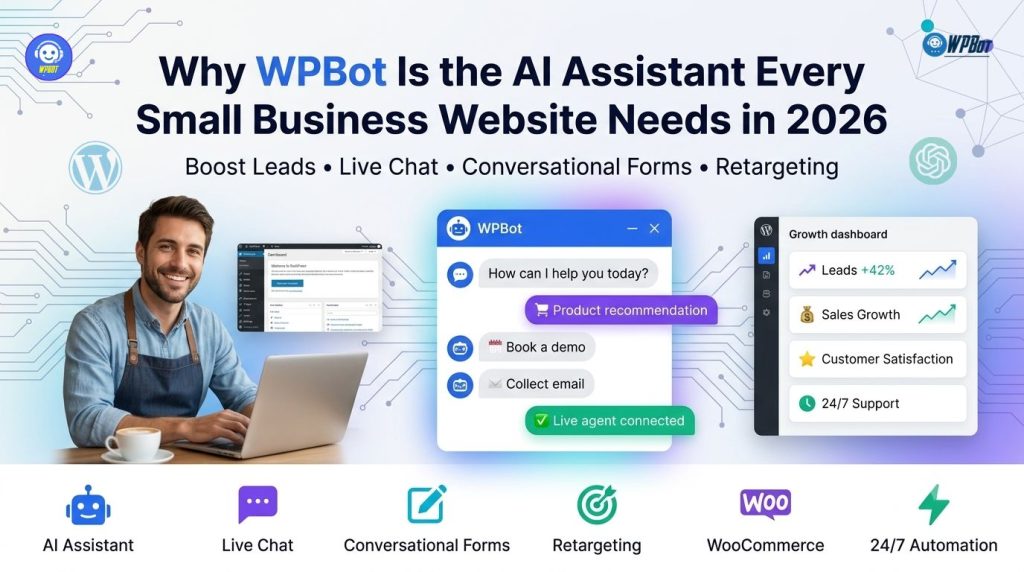
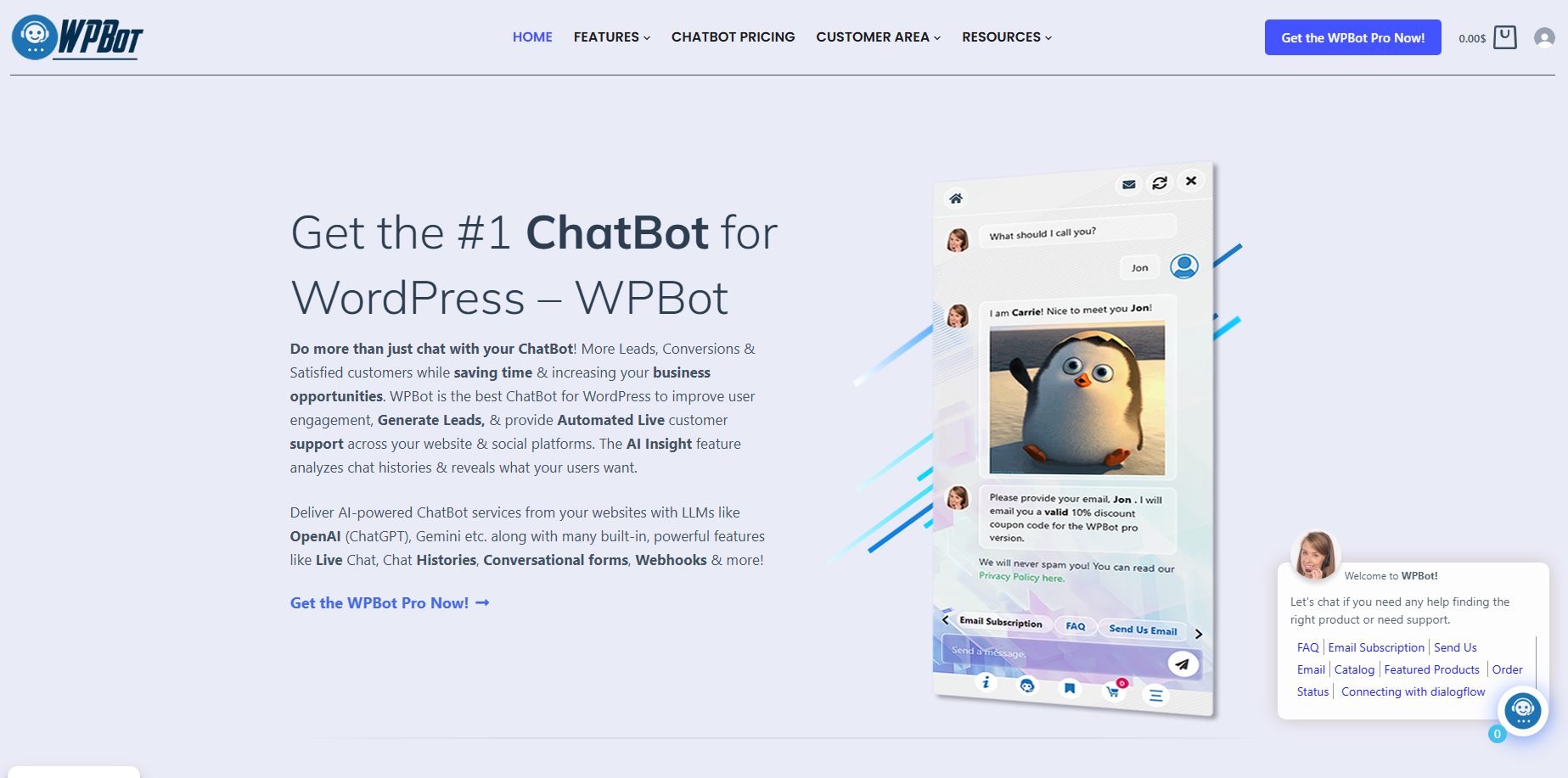
WPBot transforms a WordPress website into an AI-powered sales and support assistant by combining conversational forms, live chat, AI-powered knowledge retrieval, WooCommerce automation, and retargeting inside one chatbot. WPBot helps small businesses answer customer questions 24/7, qualify leads, capture valuable customer data, and convert more visitors without depending on expensive monthly SaaS platforms.
Why Are Small Business Websites Still Losing Customers Every Single Day?
A visitor lands on a website with one simple goal: find an answer quickly. When a visitor cannot find information within a few seconds, the visitor leaves.
WPBot changes that experience by replacing long menus, confusing navigation, and slow email replies with instant conversations.
Small businesses often invest hundreds or even thousands of dollars in SEO and advertising. Unfortunately, many websites still lose visitors because nobody is available to answer simple questions after business hours.
WPBot fills that gap around the clock.
Instead of asking visitors to search through multiple pages, WPBot guides visitors toward products, services, pricing, booking pages, FAQs, and contact forms through natural conversations.
The result is simple.
More conversations.
More qualified leads.
More completed purchases.
Why Are AI Assistants Becoming Essential Instead of Optional in 2026?
Customer expectations have changed.
Visitors no longer expect websites to simply display information. Visitors expect websites to answer questions immediately.
Research across customer support industries consistently shows that response speed directly influences buying decisions.
A visitor comparing three businesses usually contacts the business that responds first.
WPBot gives small businesses the ability to respond instantly without hiring additional support staff.
Instead of waiting for office hours, WPBot provides immediate answers using your website content, knowledge base, FAQs, WooCommerce products, or AI models.
That means customers receive useful responses at midnight just as easily as they do during business hours.
What Makes WPBot Different From Typical Website Chatbots?
Many website chatbots still rely on rigid decision trees.
Those chatbots only understand predefined buttons.
Those chatbots quickly become frustrating.
WPBot combines traditional chatbot automation with modern AI capabilities, allowing conversations to feel much more natural.
Instead of asking visitors to click through endless menus, WPBot can understand questions, retrieve relevant information, recommend products, and continue meaningful conversations.
For WordPress websites, WPBot keeps everything inside the existing website ecosystem instead of forcing businesses into another monthly subscription platform.
Why Should Small Businesses Care About Owning Their Customer Conversations?
Customer conversations are valuable business assets.
Many SaaS chatbot providers store conversations on external platforms while charging monthly fees for access.
WPBot allows WordPress website owners to keep customer conversations inside their own WordPress environment while maintaining greater control over customer data, integrations, and workflows.
That ownership becomes increasingly important as privacy regulations continue evolving worldwide.
The First Core Pillar: Why Are Conversational Forms Replacing Traditional Contact Forms?
Traditional contact forms ask visitors to complete multiple fields before receiving any value.
Most visitors never finish.
WPBot transforms static forms into interactive conversations that feel natural instead of intimidating.
Instead of displaying eight empty input boxes, WPBot asks one question at a time.
That simple change often improves completion rates because visitors only focus on one answer instead of an overwhelming form.
Benefit #1 — Why Does WPBot Capture More Leads Than Static Forms?
Static forms create friction.
Every additional field increases abandonment.
WPBot removes that friction by turning lead generation into a guided conversation.
Instead of displaying ten required fields, WPBot collects information naturally.
Example conversation:
· Welcome message
· Customer name
· Email address
· Company name
· Budget
· Project type
· Preferred meeting time
Visitors answer each question without feeling overwhelmed.
The experience feels like chatting with a real assistant instead of filling out paperwork.
Traditional Form vs WPBot Conversational Form
|
Feature |
Traditional Form |
WPBot Conversational Form |
|
All questions shown immediately |
Yes |
No |
|
Step-by-step guidance |
No |
Yes |
|
Natural conversation |
No |
Yes |
|
Progressive data collection |
No |
Yes |
|
Mobile-friendly interaction |
Moderate |
Excellent |
|
Visitor engagement |
Low |
High |
Why Does Progressive Questioning Increase Form Completion?
People naturally respond to conversations.
People rarely enjoy paperwork.
WPBot collects one answer before asking the next question.
That conversational flow reduces cognitive load.
Instead of asking:
· Name
· Phone
· Company
· Budget
· Timeline
· Message
WPBot asks:
Hi! What’s your name?
After receiving the answer:
Nice to meet you! What’s your email address?
The visitor never feels overwhelmed.
Benefit #2 — How Does WPBot Qualify Leads Before Your Sales Team Gets Involved?
Not every visitor is ready to buy.
Sales teams lose valuable time answering repetitive questions from unqualified leads.
WPBot automatically qualifies prospects before anyone from the sales team gets involved.
Typical qualification questions include:
· Business size
· Industry
· Budget range
· Purchase timeline
· Product interest
· Current challenges
Every answer helps sales teams prioritize the highest-value opportunities.
Example Lead Qualification Workflow Using WPBot
|
Visitor Response |
WPBot Action |
|
Budget above target |
Mark as high-priority lead |
|
Needs demo |
Offer booking link |
|
Needs pricing |
Display pricing page |
|
Needs documentation |
Open knowledge base |
|
Existing customer |
Route toward support |
Instead of manually sorting emails every morning, businesses receive structured lead information immediately.
Why Does Better Lead Qualification Produce Better ROI?
Imagine a website receives:
· 2,000 visitors/month
· 120 inquiries
· 30 qualified leads
· 8 customers
Now imagine WPBot improves qualification accuracy by filtering low-quality inquiries while increasing completed conversations.
Example:
|
Metric |
Before WPBot |
After WPBot |
|
Monthly Visitors |
2,000 |
2,000 |
|
Conversations |
120 |
210 |
|
Qualified Leads |
30 |
72 |
|
Sales |
8 |
18 |
Even without increasing website traffic, WPBot helps businesses identify stronger buying intent earlier.
Benefit #3 — Why Does WPBot Collect Better Customer Data Without Feeling Intrusive?
Visitors dislike complicated forms.
Visitors appreciate relevant conversations.
WPBot collects meaningful business information naturally throughout a conversation instead of demanding everything upfront.
Examples include:
· Email address
· Phone number
· Product preference
· Budget
· Preferred service
· Company size
· Purchase timeframe
Each answer builds a richer customer profile.
Each answer also creates opportunities for smarter follow-up campaigns.
Why Does Context Matter More Than Raw Form Fields?
Collecting twenty fields does not guarantee useful information.
Collecting the right information at the right moment creates better customer experiences.
WPBot adjusts conversations based on previous responses.
A visitor interested in WooCommerce products receives product-related questions.
A visitor requesting development services receives service-related questions.
That personalization keeps conversations relevant from beginning to end.
Benefit #4 — Why Can WPBot Replace Multiple Lead Generation Plugins?
Many small businesses install separate plugins for:
· Contact forms
· Chat widgets
· Lead capture
· Product recommendations
· FAQ systems
· AI assistants
Managing multiple plugins increases maintenance complexity.
Managing multiple plugins also creates inconsistent customer experiences.
WPBot combines conversational forms, AI conversations, WooCommerce assistance, FAQs, knowledge retrieval, and lead capture into one unified experience.
That means fewer plugins to configure.
Fewer plugin conflicts.
Less maintenance.
More consistency.
How Does WPBot Fit Into a Modern Small Business Sales Funnel?
Instead of sending visitors through disconnected pages, WPBot creates one continuous conversation.
A simple workflow looks like this:
1. Visitor lands on the homepage.
2. WPBot starts a friendly greeting.
3. WPBot identifies visitor intent.
4. WPBot answers initial questions.
5. WPBot recommends products or services.
6. WPBot collects contact information.
7. WPBot qualifies the lead.
8. WPBot sends the lead to the appropriate workflow.
Every step happens inside a single conversational experience, reducing friction while keeping visitors engaged.
Why Does WPBot Live Chat Help Small Businesses Compete Like Enterprise Brands?
Every missed conversation is a missed opportunity.
WPBot combines AI automation with human live chat, allowing small businesses to answer routine questions instantly while giving staff the ability to join important conversations when personal assistance matters.
Unlike traditional live chat systems that require someone to stay online all day, WPBot continues helping visitors even when no operator is available.
That combination keeps customer service responsive without dramatically increasing staffing costs.
The Second Core Pillar: Why Is Live Chat Still Critical in the Age of AI?
Many business owners assume AI replaces live chat.
That assumption is wrong.
WPBot uses AI to make live chat smarter, not obsolete.
Some visitors only need a quick answer about pricing.
Some visitors need technical guidance.
Some visitors simply want reassurance from a real person before purchasing.
WPBot identifies those situations and supports both automated and human conversations.
Benefit #5 — Why Does WPBot Answer Questions Before Visitors Leave Your Website?
Website visitors rarely wait.
Industry research consistently shows that response time directly influences conversion rates.
WPBot answers common questions within seconds by searching website content, FAQs, WooCommerce products, knowledge base articles, and AI-generated responses.
Instead of waiting hours for an email reply, visitors receive immediate guidance.
Typical questions include:
· What are your business hours?
· Do you offer refunds?
· Which pricing plan fits my business?
· Is this product in stock?
· How long does shipping take?
· How can I contact support?
Every instant answer reduces frustration.
Every instant answer increases the chance that visitors continue exploring the website.
How WPBot Responds to Different Customer Questions
|
Visitor Question |
WPBot Response Source |
|
Product details |
WooCommerce products |
|
Documentation |
Knowledge Base |
|
Company policy |
FAQ database |
|
Complex questions |
AI Model |
|
Order information |
WooCommerce integration |
|
Custom business data |
Custom training content |
Instead of forcing visitors to search through menus, WPBot delivers answers inside one conversation.
Why Does Faster Response Time Improve Customer Trust?
Visitors naturally trust businesses that respond quickly.
Waiting several hours creates uncertainty.
Waiting several days often ends the buying journey completely.
WPBot removes unnecessary waiting by becoming the first responder for every website visitor.
Even when a human agent eventually joins the conversation, WPBot has already collected valuable context.
That context helps human agents solve problems much faster.
Benefit #6 — How Does WPBot Combine AI Automation With Human Live Chat?
Automation should never trap customers.
Visitors appreciate automation when automation solves problems.
Visitors appreciate humans when conversations become more complicated.
WPBot supports both experiences.
A visitor may begin with AI assistance.
A human operator can join whenever additional expertise becomes necessary.
That creates a seamless support experience.
Typical AI-to-Human Workflow
1. Visitor opens chat.
2. WPBot welcomes the visitor.
3. WPBot identifies customer intent.
4. WPBot answers routine questions.
5. WPBot detects a complex request.
6. WPBot transfers the conversation to a live operator.
7. Human agent continues with complete conversation history.
No repeated explanations.
No starting over.
No customer frustration.
Why Does Conversation Context Matter During Live Chat?
Imagine explaining a technical problem three different times.
Customers dislike repeating information.
Support teams dislike asking duplicate questions.
WPBot preserves conversation history before transferring the visitor to a human representative.
Human agents immediately understand:
· Customer name
· Previous questions
· Products discussed
· Support history
· AI responses already provided
That continuity dramatically improves support efficiency.
Benefit #7 — Why Does WPBot Reduce Support Workload Without Reducing Customer Satisfaction?
Support teams spend a surprising amount of time answering repetitive questions.
Examples include:
· Password reset
· Business hours
· Shipping policies
· Refund policies
· Product availability
· Pricing
Those conversations rarely require human judgment.
WPBot automates those repetitive interactions.
Support staff can focus on conversations that genuinely require experience, empathy, or technical expertise.
Example Monthly Support Savings
Imagine a business receives:
· 900 support requests/month
· 65% repetitive questions
· Average handling time: 6 minutes
Without automation:
900 × 6 minutes = 5,400 minutes
That’s approximately 90 support hours every month.
Now assume WPBot automatically resolves 60% of repetitive requests.
Remaining manual requests:
360
Manual support time:
360 × 6 = 2,160 minutes
Approximately 36 support hours.
Monthly Time Saved
|
Metric |
Before WPBot |
After WPBot |
|
Support Requests |
900 |
900 |
|
Manual Conversations |
900 |
360 |
|
Support Hours |
90 |
36 |
|
Time Saved |
0 |
54 Hours |
Those recovered hours can be invested in:
· Sales calls
· Customer onboarding
· Product improvements
· Marketing campaigns
Why Does WPBot Scale Better During Traffic Spikes?
Many small businesses experience unpredictable demand.
Examples include:
· Holiday sales
· Black Friday
· Product launches
· Seasonal promotions
· Viral social media posts
Hiring temporary support staff is expensive.
Training temporary staff also takes time.
WPBot continues answering thousands of repetitive questions simultaneously without becoming overwhelmed.
That scalability helps small businesses handle enterprise-level traffic using existing resources.
Benefit #8 — Why Does WPBot Keep Visitors Engaged Instead of Letting Them Bounce?
Website bounce rates often increase because visitors cannot find answers quickly.
Every unanswered question increases the chance that visitors leave for a competitor.
WPBot encourages visitors to continue interacting by proactively offering assistance.
Instead of waiting for frustration, WPBot starts conversations at meaningful moments.
Examples include:
· First website visit
· Product page visit
· Pricing page visit
· Checkout page hesitation
· Knowledge base browsing
Those proactive conversations keep visitors engaged before they disappear.
Why Does Proactive Live Chat Generate Better Conversions?
Timing matters.
Interrupting visitors immediately feels intrusive.
Waiting too long misses the opportunity.
WPBot allows businesses to trigger conversations based on user behavior.
Examples include:
· Time spent on page
· Scroll percentage
· Exit intent
· Product category
· Returning visitor status
· Cart value
· Visited pages
Instead of showing generic popups, WPBot starts contextual conversations.
That creates a much better user experience.
WPBot Live Chat vs Traditional Live Chat
|
Feature |
Traditional Live Chat |
WPBot Live Chat |
|
Human agent required |
Yes |
Optional |
|
AI responses |
No |
Yes |
|
WooCommerce integration |
Limited |
Native |
|
Knowledge Base search |
Rare |
Yes |
|
FAQ automation |
Limited |
Yes |
|
Conversation history |
Varies |
Yes |
|
Lead qualification |
Usually separate |
Built in |
|
Conversational forms |
No |
Yes |
|
AI model integration |
Rare |
Yes |
|
Human handoff |
Manual |
Seamless |
Why Does WPBot Cost Less Than Most SaaS Chat Platforms?
Many SaaS chat platforms charge recurring fees based on:
· Number of operators
· Monthly conversations
· AI credits
· Visitor volume
· Automation features
Monthly costs continue increasing as businesses grow.
WPBot follows a different approach.
Because WPBot runs directly inside WordPress, businesses avoid many recurring SaaS expenses while keeping greater control over customer interactions.
Typical Cost Comparison
|
Feature |
Typical SaaS Chatbot |
WPBot |
|
Monthly subscription |
Usually required |
No recurring plugin fee (license dependent) |
|
Visitor limits |
Often limited |
Website controlled |
|
Operator charges |
Common |
No per-agent pricing |
|
Data ownership |
Vendor platform |
WordPress website |
|
WooCommerce integration |
Extra cost on some plans |
Included integration |
|
AI provider choice |
Often limited |
Multiple AI providers supported |
Simple ROI Example for Live Chat
Assume a business receives:
· 6,000 visitors each month
· 2% conversion rate
· Average order value: $80
Monthly revenue:
6,000 × 2% × $80 = $9,600
Now imagine WPBot improves conversion from 2% to 2.5% by answering customer questions before visitors leave.
New monthly revenue:
6,000 × 2.5% × $80 = $12,000
Additional monthly revenue:
$2,400
Annual increase:
$28,800
Actual results vary by industry, traffic quality, pricing, and implementation, but even modest improvements in conversion rate can produce meaningful revenue growth.
How Does WPBot Fit Into the Complete Customer Journey?
A successful customer journey rarely begins with checkout.
A successful customer journey begins with trust.
WPBot supports that journey from the first greeting through post-purchase support.
A typical workflow looks like this:
1. Visitor lands on the homepage.
2. WPBot welcomes the visitor.
3. WPBot answers product questions.
4. WPBot recommends relevant products or services.
5. WPBot captures lead information when appropriate.
6. WPBot transfers complex conversations to a human agent if needed.
7. WPBot continues supporting the customer after the purchase with FAQs, documentation, and order-related assistance.
That continuous assistance helps small businesses deliver a customer experience that feels responsive, consistent, and professional.
Why Are Most Small Businesses Losing Sales After Visitors Leave Their Website?
Getting traffic is only half the battle.
Keeping visitors engaged after they leave the website is where sustainable growth happens.
Many small businesses spend significant budgets on SEO, Google Ads, and social media campaigns. Unfortunately, a large percentage of visitors leave without purchasing, booking, or submitting a contact form.
WPBot helps solve that problem by capturing visitor intent before visitors disappear and by creating opportunities for intelligent follow-up.
That approach transforms anonymous website traffic into identifiable business opportunities.
Why Does Retargeting Start Before a Visitor Leaves?
Many businesses think retargeting begins with Facebook Ads or Google Ads.
Modern customer journeys begin much earlier.
WPBot starts retargeting while visitors are still interacting with the website.
Every conversation creates valuable context.
Every answer helps WPBot understand customer intent.
Instead of guessing what visitors might want later, WPBot collects information directly from the conversation.
Benefit #9 — How Does WPBot Capture Leads Before Visitors Disappear?
Many visitors browse several pages without taking action.
Some visitors compare prices.
Some visitors read documentation.
Some visitors simply become distracted.
Without lead capture, those visitors often disappear permanently.
WPBot naturally asks for contact information during conversations instead of presenting an intrusive popup.
Examples include:
· Email address
· Phone number
· Company name
· Preferred product
· Budget
· Purchase timeline
Because WPBot collects information inside an active conversation, visitors often feel more comfortable sharing details.
Traditional Popup vs WPBot Conversational Lead Capture
|
Feature |
Traditional Popup |
WPBot |
|
Interruptive |
Yes |
No |
|
Personalized |
Rarely |
Yes |
|
Context-aware |
No |
Yes |
|
Conversation history |
No |
Yes |
|
Lead qualification |
Limited |
Yes |
|
Product recommendations |
No |
Yes |
Instead of asking every visitor the same generic question, WPBot adjusts conversations based on visitor behavior.
Why Does Contextual Lead Capture Produce Better Results?
Timing matters.
A popup shown five seconds after page load usually lacks context.
A conversation started after a visitor spends three minutes reading pricing information feels much more relevant.
WPBot understands visitor actions before requesting contact information.
Examples include:
· Viewed pricing page
· Compared multiple products
· Read documentation
· Visited checkout
· Asked technical questions
That context increases the likelihood of meaningful engagement.
Benefit #10 — How Does WPBot Personalize Every Customer Journey?
Personalization no longer belongs exclusively to enterprise companies.
Small businesses can also deliver tailored experiences.
WPBot remembers conversation context and responds accordingly.
A first-time visitor receives introductory guidance.
A returning visitor receives more personalized assistance.
A customer interested in WooCommerce products receives product recommendations.
A customer exploring service pages receives consultation options.
Every interaction becomes more relevant because WPBot understands previous responses.
Example Personalized Conversation Flow
Visitor:
I’m looking for a WooCommerce chatbot.
WPBot responds:
Great! Are you looking for product recommendations, customer support automation, or both?
Visitor:
Both.
WPBot continues:
Do you already have a WooCommerce store?
Visitor:
Yes.
WPBot can now recommend WooCommerce-specific features instead of displaying generic information.
That targeted guidance improves customer experience while shortening the buying journey.
Why Does Personalization Increase Conversion Rates?
Generic marketing speaks to everyone.
Personalized conversations speak directly to individual needs.
WPBot uses customer responses to recommend:
· Products
· Services
· Documentation
· Knowledge Base articles
· Pricing plans
· Booking pages
Every recommendation becomes more relevant because every recommendation is based on actual customer intent.
Benefit #11 — How Does WPBot Support Email Marketing and CRM Automation?
Collecting email addresses only creates value when follow-up happens consistently.
WPBot helps businesses gather structured lead information that can support email marketing platforms and CRM workflows.
Instead of receiving a simple email address, businesses can also capture:
· Customer interests
· Product category
· Budget range
· Purchase timeline
· Company size
· Business type
That structured information makes future campaigns significantly more targeted.
Example Lead Data Captured by WPBot
|
Customer Data |
Business Value |
|
|
Newsletter campaigns |
|
Phone |
Sales follow-up |
|
Product interest |
Personalized recommendations |
|
Budget |
Lead scoring |
|
Timeline |
Sales prioritization |
|
Company size |
Market segmentation |
|
Industry |
Customized messaging |
Instead of treating every subscriber equally, businesses can build campaigns around customer intent.
Why Does Structured Data Improve Future Marketing?
Imagine sending identical promotional emails to every customer.
Some customers need beginner information.
Some customers need technical documentation.
Some customers are ready to purchase immediately.
WPBot captures the information needed to create smarter follow-up campaigns.
That improves engagement while reducing irrelevant marketing.
Benefit #12 — How Does WPBot Turn Anonymous Visitors Into Long-Term Customers?
The first purchase rarely becomes the last interaction.
Successful businesses build long-term relationships.
WPBot supports that goal by remaining available after the initial sale.
Returning customers often need:
· Product documentation
· Installation help
· Account guidance
· Upgrade information
· Additional product recommendations
· Troubleshooting assistance
Instead of forcing customers to search manually, WPBot continues providing value throughout the customer lifecycle.
Why Does Customer Retention Matter More Than Constant Customer Acquisition?
Acquiring new customers usually costs more than serving existing customers.
Existing customers already trust the business.
Existing customers often purchase additional products and services over time.
WPBot supports customer retention by making support faster and more accessible.
That continuous support encourages repeat visits and long-term relationships.
How Does WPBot Connect the Entire Customer Journey?
Many businesses use separate tools for:
· Contact forms
· Chat widgets
· FAQs
· AI assistants
· Live chat
· Lead capture
· Product search
· Customer support
Disconnected tools create disconnected experiences.
WPBot brings those interactions together.
A visitor can begin by asking a question.
WPBot recommends products.
WPBot answers technical questions.
WPBot collects lead information.
WPBot transfers complex conversations to a live operator.
WPBot continues supporting the customer after purchase.
That unified workflow creates a smoother experience from first visit to repeat customer.
What Does a Complete WPBot Growth Funnel Look Like?
A practical implementation might look like this:
1. Visitor arrives from Google Search.
2. WPBot welcomes the visitor.
3. WPBot identifies visitor intent.
4. WPBot recommends relevant products or services.
5. WPBot answers FAQs instantly.
6. WPBot collects lead information.
7. WPBot qualifies the opportunity.
8. WPBot transfers high-value prospects to live chat.
9. WPBot supports checkout decisions.
10. WPBot assists after the purchase with documentation and FAQs.
11. WPBot encourages future engagement through personalized follow-up.
Every stage builds on the previous conversation, creating a continuous customer experience instead of isolated interactions.
Why Does WPBot Offer More Long-Term Value Than Combining Multiple Plugins?
Many small businesses assemble a technology stack from several unrelated plugins.
That often leads to duplicated features, inconsistent user experiences, and additional maintenance.
The comparison below illustrates the difference.
|
Business Need |
Separate Plugin |
WPBot |
|
AI Assistant |
Required |
Included |
|
Conversational Forms |
Required |
Included |
|
Live Chat |
Required |
Included |
|
FAQ Search |
Required |
Included |
|
WooCommerce Assistant |
Required |
Included |
|
Product Recommendations |
Required |
Included |
|
Lead Qualification |
Required |
Included |
|
Retargeting Workflows |
Multiple integrations |
Supported through conversation-driven workflows |
Using fewer plugins can simplify updates, reduce compatibility concerns, and create a more consistent experience for website visitors.
How Can Small Businesses Measure Success After Installing WPBot?
Adding an AI assistant should produce measurable outcomes.
Useful performance indicators include:
· Conversation Start Rate – How many visitors begin interacting with WPBot.
· Lead Capture Rate – How many conversations produce contact information.
· Qualified Lead Rate – How many conversations result in sales-ready prospects.
· Human Escalation Rate – How often WPBot transfers conversations to live agents.
· Average Response Time – How quickly WPBot answers customer questions.
· Customer Satisfaction Score (CSAT) – How visitors rate conversations.
· Conversion Rate – How many conversations lead to purchases or inquiries.
· Support Deflection Rate – How many repetitive questions WPBot resolves without human intervention.
Tracking these metrics over time provides a clear picture of how conversational automation contributes to business growth.
What Should Developers Know Before Deploying WPBot on a Production Website?
Choosing an AI assistant is not only about features.
WPBot should also satisfy technical requirements such as performance, security, scalability, privacy, and long-term maintainability.
The following section answers the questions experienced WordPress developers, agencies, and technical decision-makers frequently ask before deploying WPBot.
How Much Server Overhead Does WPBot Add to a WordPress Website?
Performance matters.
Every plugin should justify the resources it consumes.
WPBot runs inside WordPress, so overall performance depends on several factors:
· Hosting quality
· PHP version
· WordPress optimization
· AI provider
· Traffic volume
· Caching strategy
For websites using knowledge-base search or rule-based conversations, WPBot generally adds minimal server overhead because most operations are lightweight database queries and WordPress functions.
When AI providers such as OpenAI, Google Gemini, DeepSeek, or OpenRouter are enabled, the computational work happens on the external AI provider rather than on the local web server.
That means the local server mainly handles:
· Receiving visitor requests
· Sending API requests
· Receiving AI responses
· Displaying responses inside the chat interface
Recommended Hosting for WPBot
|
Website Size |
Suggested Hosting |
|
Small business brochure website |
Shared hosting with modern PHP |
|
WooCommerce store |
Managed WordPress hosting |
|
High-traffic business website |
VPS or Cloud Server |
|
Enterprise WooCommerce |
Dedicated or scalable cloud infrastructure |
For best performance, pair WPBot with:
· PHP 8.2+
· HTTP/2 or HTTP/3
· Redis Object Cache (optional)
· OPcache enabled
· SSD or NVMe storage
· A CDN for static assets
How Can Developers Control API Token Costs?
AI API costs should never become unpredictable.
WPBot gives website owners flexibility because WPBot supports multiple AI providers instead of locking businesses into a single proprietary model.
Common AI providers include:
· OpenAI
· DeepSeek
· Ollama (self-hosted)
· Mistral AI (depending on integration support)
Developers can manage API usage by:
· Selecting smaller models for routine conversations
· Limiting maximum response length
· Restricting AI to complex questions only
· Using FAQ and Knowledge Base answers before calling external AI
· Monitoring API dashboards regularly
A practical workflow is:
1. WPBot searches FAQs.
2. WPBot searches the Knowledge Base.
3. WPBot searches WooCommerce products.
4. WPBot calls the AI provider only when local content cannot answer the question.
That layered approach reduces unnecessary token consumption while maintaining a good user experience.
How Does WPBot Support GDPR and Privacy Requirements?
Privacy regulations continue evolving.
Businesses should always review local legal requirements before collecting or processing personal information.
WPBot helps website owners build privacy-conscious workflows by allowing control over what information is requested and stored.
Typical customer data may include:
· Name
· Email address
· Phone number
· Conversation history
· Product interests
· Form responses
Good privacy practices include:
· Displaying a clear privacy policy
· Requesting consent where required
· Limiting stored personal data
· Defining retention periods
· Restricting administrator access
· Encrypting website traffic with HTTPS
When external AI services are enabled, administrators should also understand the data handling policies of the selected AI provider.
How Does WPBot Handle Security Best Practices?
Security is a continuous process rather than a one-time task.
Like every actively maintained WordPress plugin, WPBot benefits from keeping installations up to date with the latest releases.
A secure deployment should also include:
· Strong administrator passwords
· Two-factor authentication
· Regular WordPress updates
· Secure hosting
· Daily backups
· Malware monitoring
· Web application firewall (WAF)
Developers should test updates on a staging website before deploying changes to production.
That practice reduces operational risk and helps identify compatibility issues early.
How Does WPBot Handle Webhook Performance?
Many modern business workflows depend on webhooks.
Examples include:
· CRM synchronization
· Email marketing automation
· Zapier workflows
· Make (Integromat) scenarios
· Internal business applications
Webhook response times depend on:
· Destination server
· Internet latency
· Third-party API performance
· Payload size
WPBot should connect to reliable webhook endpoints that respond quickly and implement appropriate timeout and retry strategies where available.
For high-volume websites, asynchronous processing can further improve the visitor experience by preventing long waits during external integrations.
How Should Developers Deploy WPBot on Production Websites?
A structured deployment process reduces surprises.
A recommended workflow looks like this:
1. Install WPBot on a staging website.
2. Configure AI providers.
3. Build conversational forms.
4. Import FAQs and Knowledge Base content.
5. Test WooCommerce integration.
6. Configure live chat workflows.
7. Test webhook integrations.
8. Review analytics.
9. Verify mobile responsiveness.
10. Deploy to production.
Testing before launch improves reliability and customer confidence.
FAQ
Visitors expect to find answers quickly and may leave if they cannot find information within a few seconds.
WPBot fills the gap by providing instant answers around the clock, ensuring visitors get responses even outside office hours.
WPBot combines traditional chatbot automation with modern AI capabilities, making conversations more natural and less frustrating for visitors.
Conversational forms improve completion rates by asking one question at a time instead of overwhelming visitors with multiple empty input boxes.
WPBot turns lead generation into a guided conversation, removing friction and making the experience feel like chatting with a real assistant.
WPBot combines AI automation with human live chat, allowing small businesses to provide instant responses and join important conversations when needed.
WPBot uses AI to enhance live chat by making it smarter, identifying situations where automated responses are sufficient and when human assistance is required.
Website visitors rarely wait, and instant answers provided by WPBot reduce frustration and increase the likelihood of visitors staying on the website.
Why Does WPBot Make Sense for Small Businesses in 2026?
Small businesses no longer compete only on price.
Small businesses compete on responsiveness, customer experience, and availability.
WPBot combines conversational forms, AI-powered assistance, live chat, WooCommerce support, Knowledge Base search, lead qualification, and conversation-driven retargeting into a single WordPress solution.
Instead of managing separate plugins for every customer interaction, WPBot helps create one connected experience from the first website visit to post-purchase support.
For growing businesses, that means fewer disconnected workflows, faster customer responses, better-qualified leads, and a more scalable support process—all while keeping greater control over data within the WordPress ecosystem.