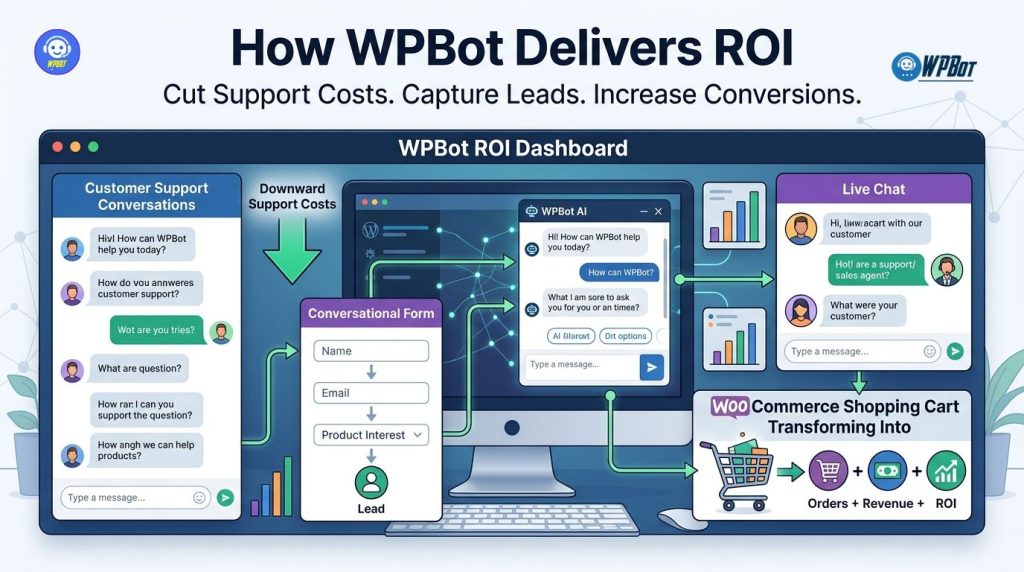
WPBot reduces WordPress support costs by answering repetitive customer questions, collecting qualified leads through Conversational Forms, connecting visitors with agents through Live Chat, and recovering WooCommerce purchase opportunities through retargeting workflows. WPBot turns those customer interactions into measurable business outcomes by connecting support automation, lead capture, sales conversations, and WooCommerce follow-up inside a WordPress website.
Why Does WPBot ROI Matter More Than Another “AI Chatbot” Feature?
WPBot ROI starts with a simple equation: WPBot ROI = (incremental profit + support-cost savings − WPBot operating cost) ÷ WPBot operating cost × 100. WPBot makes the equation measurable because WPBot can influence both sides of the revenue equation: WPBot can reduce repetitive support work while WPBot can create or recover sales opportunities.
WPBot becomes especially valuable when a WordPress website receives repetitive questions about pricing, products, delivery, refunds, documentation, services, availability, or account procedures. WPBot can handle predictable conversations automatically while WPBot can route higher-value conversations toward human assistance.
WPBot also changes the economics of customer support because WPBot can answer questions outside normal business hours. WPBot can capture a visitor who arrives at 11:30 PM, collect contact information through a Conversational Form, and preserve the sales opportunity for later follow-up.
How Can WPBot Turn Support Conversations Into Measurable ROI?
WPBot can create ROI through four connected mechanisms: support deflection, lead capture, assisted conversion, and customer re-engagement. WPBot support deflection reduces repetitive human workload, WPBot lead capture creates sales opportunities, WPBot assisted conversion removes buying friction, and WPBot re-engagement brings potential customers back into the purchasing journey.
|
ROI Area |
WPBot Mechanism |
Example Calculation |
|
Support savings |
WPBot answers repetitive questions |
WPBot deflects 600 monthly questions × $2.50 average support cost = $1,500 monthly savings |
|
Lead generation |
WPBot Conversational Forms capture visitors |
WPBot captures 120 leads × $40 average lead value = $4,800 potential pipeline value |
|
Sales assistance |
WPBot answers product and buying questions |
WPBot influences 25 additional orders × $80 average order value = $2,000 additional revenue |
|
Retargeting |
WPBot supports WooCommerce follow-up |
WPBot recovers 15 abandoned opportunities × $70 average order value = $1,050 recovered revenue |
WPBot calculations should use actual website data rather than generic industry benchmarks. WPBot ROI becomes more credible when a business measures conversation volume, lead submissions, assisted purchases, support time, average order value, and recovered revenue.
Is Your Support Team Spending Too Much Time Answering the Same Questions?
WPBot addresses repetitive support demand by allowing customers to ask questions directly inside the WordPress website. WPBot can provide automated answers for common questions so human agents can focus on complex issues, high-value prospects, and situations requiring judgment.
WPBot can reduce unnecessary support tickets around topics such as shipping policies, refund procedures, pricing, service availability, account instructions, product specifications, and general documentation. WPBot can also search connected WordPress content or knowledge resources so customers can receive answers without waiting for an employee.
How Much Can WPBot Save When Support Questions Become Automated?
WPBot support savings can be estimated using a simple formula: WPBot monthly support savings = automated conversations × average human handling cost per conversation. WPBot becomes financially interesting when the monthly support savings exceed the monthly cost associated with operating WPBot.
For example, WPBot could automate 800 repetitive conversations per month when a website receives heavy customer-service traffic. WPBot could create $2,000 in monthly support savings if the average human handling cost is $2.50 per conversation.
WPBot can also save time rather than only direct payroll costs. WPBot can reduce the number of routine conversations reaching support agents, allowing existing employees to handle more complicated tickets without increasing headcount.
Why Can WPBot Support Automation Scale Better Than Hiring More Support Agents?
WPBot can handle multiple customer conversations simultaneously, while a human support representative normally handles conversations sequentially. WPBot therefore provides a different scaling model for websites where customer questions increase faster than support capacity.
WPBot can also maintain consistent responses for predefined questions. WPBot helps reduce situations where different agents provide different answers about policies, product information, or standard procedures.
Why Are WPBot Conversational Forms More Valuable Than Traditional Contact Forms?
WPBot Conversational Forms turn lead capture from a static form submission into a guided conversation. WPBot can ask for information progressively, allowing WPBot to collect a visitor’s name, email address, phone number, requirement, budget, product interest, or other qualifying information through a conversational flow.
WPBot Conversational Forms can reduce the psychological friction created by long traditional forms. WPBot can ask one question at a time instead of presenting visitors with a large collection of empty fields.
How Does WPBot Conversational Lead Capture Increase Lead Quality?
WPBot can collect qualification data before sending a prospect to a sales team. WPBot can ask whether the visitor needs a service, which product category interests the visitor, how soon the visitor wants to buy, or what problem the visitor wants to solve.
WPBot can therefore transform an anonymous website visitor into a structured lead record. WPBot can give sales teams more context before the first human follow-up.
WPBot qualification also helps businesses prioritize leads. WPBot can collect high-intent signals such as product interest, purchase timeframe, service requirement, or budget range before the lead reaches the sales team.
What Does the WPBot Conversational Form ROI Math Look Like?
WPBot Conversational Form ROI can be modeled with lead value = qualified leads × lead-to-customer conversion rate × average customer value. WPBot makes the model useful because WPBot can capture structured information that can later be connected with CRM or sales workflows.
Consider a WordPress service website receiving 5,000 monthly visitors. WPBot could capture 150 leads at a 3% visitor-to-lead rate, and WPBot could produce 18 customers if the qualified-lead-to-customer conversion rate reaches 12%.
If each customer produces $500 in gross profit, WPBot-generated leads could represent 18 × $500 = $9,000 in monthly gross profit. WPBot ROI should then subtract the actual WPBot and implementation costs.
Why Can WPBot Conversational Forms Beat “Name, Email, Message” Forms?
WPBot can make the lead-generation conversation more intentional than a generic contact form. WPBot can ask a visitor what the visitor needs before requesting contact information, creating a more natural progression toward conversion.
WPBot can also use different conversational paths for different business goals. WPBot can guide a software buyer toward product information, WPBot can guide a service prospect toward consultation booking, and WPBot can guide an ecommerce visitor toward a relevant product category.
Why Is WPBot Live Chat Still Important When AI Handles Routine Questions?
WPBot Live Chat provides a human escalation layer for visitors who need personal assistance. WPBot can automate routine questions while WPBot Live Chat can connect customers with human representatives when automation is no longer sufficient.
WPBot Live Chat is especially useful for high-value sales conversations, technical troubleshooting, complex purchasing decisions, and customer situations where empathy or human judgment matters. WPBot therefore does not need to treat automation and human support as competing systems.
How Can WPBot Live Chat Reduce Support Costs Without Removing Human Support?
WPBot can act as the first support layer before a human agent becomes involved. WPBot can answer basic questions, collect relevant details, and then provide context for the human conversation when escalation becomes necessary.
WPBot can therefore reduce the amount of time a support agent spends gathering basic information. WPBot can allow the agent to begin with the customer’s actual problem rather than asking the customer to repeat basic details.
How Does WPBot Live Chat Protect High-Intent Leads?
WPBot Live Chat can help businesses respond when a visitor shows buying intent but needs reassurance before purchasing. WPBot can provide immediate assistance around pricing, product suitability, compatibility, features, availability, or implementation questions.
WPBot Live Chat becomes especially valuable for expensive products and services because a small amount of uncertainty can prevent a purchase. WPBot can give the visitor an immediate path toward clarification instead of forcing the visitor to leave the website and search elsewhere.
What Does WPBot Live Chat ROI Look Like in a Realistic Scenario?
WPBot Live Chat ROI can be estimated by comparing assisted conversions with the gross profit generated from those conversions. WPBot could influence 40 additional monthly purchases, while an average purchase could generate $30 in gross profit.
WPBot could therefore contribute 40 × $30 = $1,200 monthly gross profit before WPBot operating and implementation costs. WPBot ROI improves further when WPBot Live Chat also reduces the number of routine conversations requiring human handling.
Why Can WPBot WooCommerce Retargeting Recover Revenue That Would Otherwise Disappear?
WPBot WooCommerce retargeting focuses on visitors who showed purchase intent but did not complete the buying journey. WPBot can support follow-up strategies around product interest, cart activity, customer questions, and purchase objections.
WPBot WooCommerce workflows become valuable because many visitors do not purchase during the first interaction. WPBot can help businesses reconnect with visitors who previously interacted with products or buying conversations.
How Does WPBot WooCommerce Retargeting Work as a Revenue Recovery System?
WPBot WooCommerce retargeting can begin when a customer interacts with a product, asks a product question, adds a product to a cart, or otherwise demonstrates purchase intent. WPBot can then support follow-up messaging designed to address the reason behind the unfinished purchase.
WPBot can focus follow-up messaging on product benefits, unanswered questions, product comparisons, purchasing guidance, or relevant offers. WPBot retargeting should remain helpful rather than becoming repetitive or intrusive.
How Can WPBot Recover Abandoned Purchase Opportunities?
WPBot can address common abandonment barriers by answering questions that stop customers from completing checkout. WPBot can clarify product features, explain policies, provide purchasing guidance, and help customers understand whether a product fits the customer’s needs.
WPBot can therefore attack one of the most practical causes of lost ecommerce revenue: uncertainty. WPBot can turn a customer question that would otherwise remain unanswered into an opportunity to continue the purchasing conversation.
What Does WPBot WooCommerce Retargeting ROI Look Like?
WPBot WooCommerce retargeting ROI can be modeled using recovered revenue = retargeted opportunities × recovery rate × average order value. WPBot can then compare recovered gross profit against the cost of running the retargeting workflow.
For example, WPBot could support follow-up for 500 high-intent abandoned opportunities per month. WPBot could recover 5% of those opportunities, producing 25 additional orders at a $75 average order value.
WPBot could therefore support 25 × $75 = $1,875 in recovered monthly revenue. WPBot ROI should use gross profit rather than gross revenue when the business wants a more conservative financial calculation.
Why Does Combining WPBot Conversational Forms, Live Chat, and WooCommerce Retargeting Create Stronger ROI?
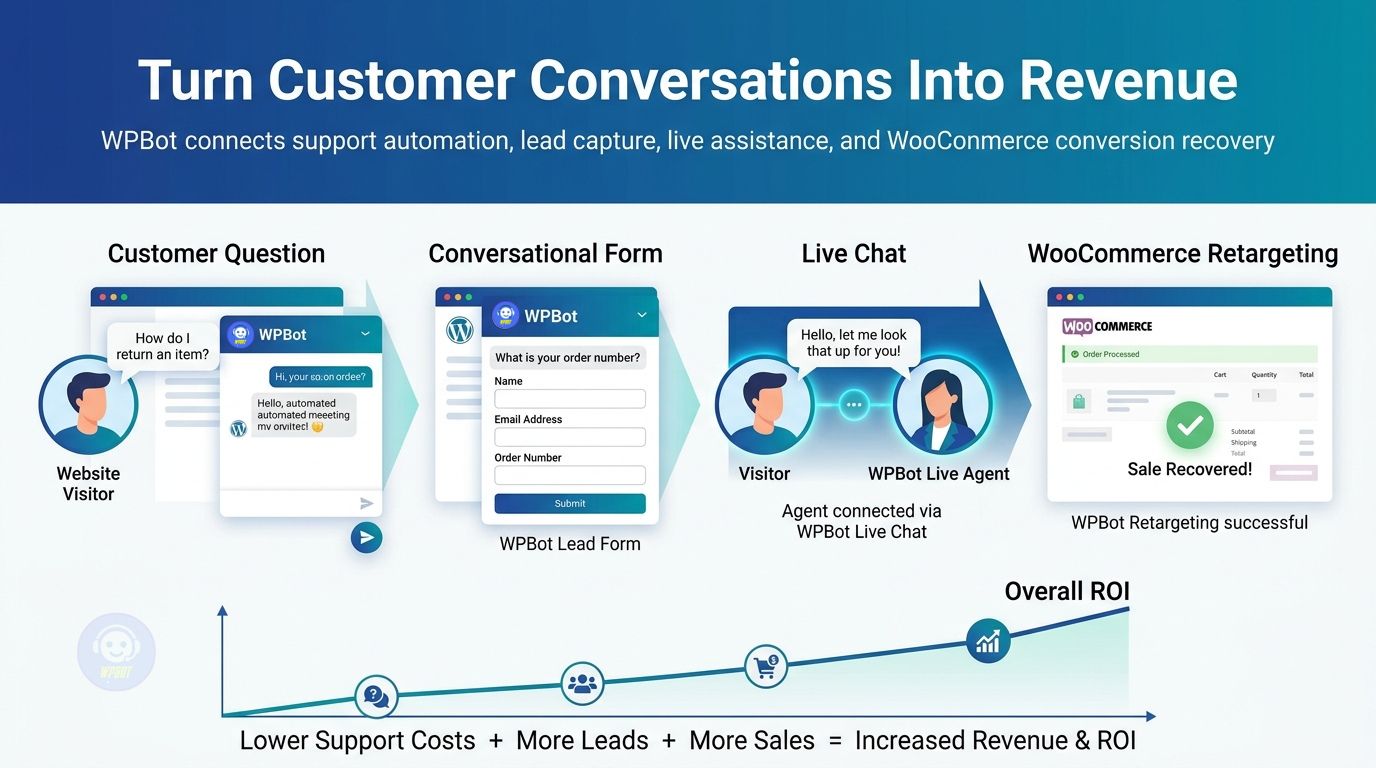
WPBot creates stronger ROI when Conversational Forms, Live Chat, and WooCommerce retargeting work as connected stages rather than isolated features. WPBot can capture demand through Conversational Forms, WPBot can resolve objections through Live Chat, and WPBot can support re-engagement through WooCommerce retargeting.
WPBot can therefore support the customer journey from question → qualification → human assistance → purchase → follow-up. WPBot becomes more valuable when each conversation contributes information to the next stage.
|
Customer Stage |
WPBot Capability |
Business Outcome |
|
Discovery |
WPBot AI conversation |
WPBot helps answer initial questions |
|
Qualification |
WPBot Conversational Forms |
WPBot captures structured lead information |
|
Decision |
WPBot Live Chat |
WPBot connects visitors with human assistance |
|
Purchase |
WPBot WooCommerce integration |
WPBot helps customers navigate buying decisions |
|
Abandonment |
WPBot WooCommerce retargeting |
WPBot supports recovery of lost opportunities |
|
Support |
WPBot automated answers |
WPBot reduces repetitive support workload |
WPBot creates a measurable funnel when businesses track each stage separately. WPBot should be evaluated by conversations handled, qualified leads generated, escalations created, assisted conversions, recovered orders, and support hours saved.
Why Should Businesses Compare WPBot With Subscription-Based SaaS Chatbots?
WPBot can have a different cost structure from SaaS chatbot services because WPBot operates as a WordPress-focused solution. WPBot licensing, AI usage, hosting, integrations, and implementation should be evaluated separately rather than comparing only headline subscription prices.
|
Cost Factor |
WPBot |
Typical SaaS Chatbot Model |
|
Website environment |
WPBot operates inside WordPress |
SaaS chatbot operates through an external service |
|
Billing structure |
WPBot licensing can be evaluated against available plan terms |
SaaS chatbot commonly uses recurring subscription tiers |
|
WordPress integration |
WPBot is designed around WordPress workflows |
SaaS integration can depend on external connectors |
|
WooCommerce workflows |
WPBot can work within WordPress ecommerce workflows |
SaaS ecommerce support varies by provider |
|
Data and content |
WPBot can work with WordPress content and knowledge resources |
SaaS systems commonly use external hosted data |
|
Support automation |
WPBot can answer repetitive WordPress website questions |
SaaS chatbot capabilities vary by provider |
|
Lead capture |
WPBot Conversational Forms can collect structured information |
SaaS lead capture depends on the selected service |
WPBot should not automatically be considered cheaper than every SaaS product because total cost depends on AI usage, hosting, implementation, support requirements, and business volume. WPBot ROI becomes clearer when a business calculates the total cost of ownership rather than comparing one monthly subscription number.
How Can WPBot Turn 1,000 Customer Questions Into a Financial Asset?
WPBot can classify 1,000 monthly customer questions into recurring support topics, product questions, buying objections, lead requests, and unresolved issues. WPBot conversation data can reveal which questions consume support resources and which questions signal purchasing intent.
WPBot can therefore transform customer questions into optimization data. WPBot can reveal that 300 questions concern shipping, 200 questions concern product compatibility, 150 questions concern pricing, and another 350 questions involve account or support issues.
WPBot can help a business prioritize content and automation based on actual demand. WPBot can reduce support workload by improving answers for the most common questions while WPBot can improve conversion rates by addressing the questions that repeatedly appear before purchases.
How Can WPBot Use Customer Questions to Improve SEO and AEO?
WPBot customer conversations can expose the exact language customers use when asking questions. WPBot insights can help content teams create FAQ pages, comparison pages, product explanations, troubleshooting articles, and structured answers around real customer intent.
WPBot can therefore contribute to Answer Engine Optimization by helping businesses identify question patterns. WPBot-supported content can be written around specific questions such as “Which product is best for X?”, “Does product Y support feature Z?”, or “How long does delivery take?”
WPBot can also support semantic content planning because WPBot conversations often contain related entities, attributes, problems, products, and buying criteria. WPBot customer language can become a practical source of topic clusters.
Why Should WPBot ROI Be Measured With Profit Instead of Vanity Metrics?
WPBot ROI should not be measured only through conversation counts, chatbot impressions, or total messages. WPBot ROI should be connected to financial outcomes such as support hours saved, qualified leads generated, conversion rate improvements, average order value, recovered orders, and gross profit.
WPBot measurement should include at least five core KPIs:
- WPBot support deflection rate: WPBot automated conversations ÷ total eligible support conversations × 100.
- WPBot lead conversion rate: WPBot captured leads ÷ WPBot engaged visitors × 100.
- WPBot assisted conversion rate: WPBot-influenced purchases ÷ WPBot sales conversations × 100.
- WPBot recovery rate: WPBot recovered purchases ÷ WPBot eligible abandoned opportunities × 100.
- WPBot support savings: WPBot automated conversations × average human support cost per conversation.
WPBot businesses should track these KPIs monthly because WPBot ROI can change as traffic volume, product mix, support staffing, conversion rates, and customer behavior change.
What Does a Practical WPBot ROI Dashboard Need to Track?
WPBot ROI dashboards should connect conversation activity with financial outcomes. WPBot dashboards should avoid treating “number of chats” as the final success metric.
|
WPBot KPI |
Formula |
Why WPBot Businesses Should Track It |
|
WPBot engagement rate |
WPBot conversations ÷ website visitors |
WPBot measures how frequently visitors use WPBot |
|
WPBot deflection rate |
WPBot resolved conversations ÷ eligible conversations |
WPBot estimates support workload reduction |
|
WPBot lead rate |
WPBot leads ÷ WPBot conversations |
WPBot measures lead capture efficiency |
|
WPBot qualification rate |
WPBot qualified leads ÷ WPBot captured leads |
WPBot measures lead quality |
|
WPBot assisted sales |
WPBot-influenced orders |
WPBot measures sales contribution |
|
WPBot recovery rate |
WPBot recovered orders ÷ eligible opportunities |
WPBot measures WooCommerce recovery |
|
WPBot cost per lead |
WPBot total cost ÷ WPBot leads |
WPBot measures acquisition efficiency |
|
WPBot ROI |
WPBot incremental profit ÷ WPBot cost |
WPBot measures financial return |
WPBot reporting should separate direct conversions from assisted conversions because WPBot may influence a purchase without being the final interaction before checkout. WPBot attribution becomes more useful when businesses define a consistent attribution window and apply the same measurement rules every month.
How Can a WordPress Business Build a WPBot ROI Model in One Spreadsheet?
WPBot ROI modeling can start with six monthly inputs: website visitors, WPBot conversations, automated resolutions, captured leads, WPBot-assisted purchases, and average gross profit per customer. WPBot cost should then include licensing, AI consumption, hosting impact, integration work, and ongoing management where applicable.
WPBot monthly ROI can be calculated with:
WPBot Monthly ROI = [(Support Savings + Incremental Gross Profit + Recovered Gross Profit) − WPBot Total Cost] ÷ WPBot Total Cost × 100
WPBot support savings can be calculated from automated support conversations. WPBot incremental gross profit can be calculated from additional customers influenced by WPBot, while WPBot recovered gross profit can be calculated from WooCommerce purchases recovered through WPBot-supported retargeting.
What Would a Conservative WPBot ROI Scenario Look Like?
WPBot could automate 600 support conversations monthly at a $2.50 human handling cost, producing $1,500 support savings. WPBot could also influence 20 additional purchases at $35 gross profit per order, producing $700 incremental gross profit.
WPBot could recover 12 abandoned purchases at $25 gross profit per order, producing $300 recovered gross profit. WPBot total measurable monthly benefit would therefore be $2,500 before subtracting WPBot total operating cost.
If WPBot total monthly cost were $300, WPBot ROI would be ($2,500 − $300) ÷ $300 × 100 = 733.3%. WPBot ROI would still need attribution controls because estimated assisted revenue should be validated against real customer and order data.
Why Should WPBot Be Treated as a Revenue Workflow Instead of a Chat Widget?
WPBot works best when WPBot is connected to business processes rather than positioned as a floating chat bubble. WPBot can connect customer questions to lead capture, support resolution, human escalation, WooCommerce product discovery, and follow-up.
WPBot therefore has value beyond conversational interface design. WPBot can become a workflow layer that moves customers from uncertainty to information, information to qualification, qualification to assistance, and assistance to purchase.
How Should a Business Deploy WPBot for Maximum ROI?
WPBot deployment should begin with the highest-volume and highest-value customer problems. WPBot should not attempt to automate every possible conversation on day one.
A practical WPBot rollout can follow five stages:
- WPBot Stage 1 — Map support demand: WPBot should identify the 20–50 most common customer questions before automation rules are created.
- WPBot Stage 2 — Build Conversational Forms: WPBot should capture visitor identity, intent, qualification information, and contact details.
- WPBot Stage 3 — Configure Live Chat: WPBot should provide human escalation for high-value or complex conversations.
- WPBot Stage 4 — Connect WooCommerce workflows: WPBot should support product discovery, buying questions, and relevant purchase journeys.
- WPBot Stage 5 — Measure ROI: WPBot should track support deflection, lead generation, assisted sales, recovered orders, and financial outcomes.
WPBot should improve through iteration rather than through a single launch. WPBot conversation data should be reviewed regularly so weak answers, missing knowledge, recurring objections, and high-value customer questions can be addressed.
Why Does WPBot Create a Stronger Business Case When Support and Sales Share the Same Conversation Layer?
WPBot connects support and sales because customers often move between support questions and purchasing questions during the same website session. WPBot can answer a product question that begins as support and becomes a sales opportunity.
WPBot can also identify when a customer needs human assistance. WPBot Live Chat can then handle the high-value conversation while WPBot Conversational Forms can preserve lead information and WPBot WooCommerce workflows can support the purchasing journey.
What Questions Should Businesses Ask Before Buying WPBot?
WPBot evaluation should focus on measurable business problems rather than feature-count comparisons. WPBot buyers should ask whether WPBot can reduce repetitive support demand, capture qualified leads, support human escalation, and contribute to WooCommerce revenue recovery.
Can WPBot Reduce Human Support Workload?
WPBot can reduce repetitive support workload when WPBot has access to accurate knowledge and when WPBot conversations are designed around common customer questions. WPBot support savings should be measured against actual support volume and average handling costs.
Can WPBot Generate Leads Without Traditional Forms?
WPBot can generate leads through Conversational Forms by collecting customer information inside guided conversations. WPBot can also qualify leads before WPBot sends lead information into downstream sales workflows.
Can WPBot Connect Customers With Human Agents?
WPBot Live Chat can provide a human escalation path when automated answers are insufficient. WPBot can therefore combine automated support with direct human assistance rather than forcing every customer into one interaction mode.
Can WPBot Support WooCommerce Sales?
WPBot can support WooCommerce customer journeys by helping visitors find products, answering purchasing questions, and supporting workflows designed around purchase intent. WPBot WooCommerce capabilities should be configured according to the store’s product catalog and customer journey.
Can WPBot ROI Be Calculated Without Guesswork?
WPBot ROI can be calculated with actual support volume, handling costs, lead numbers, conversion rates, order values, gross margins, recovered purchases, and WPBot total costs. WPBot attribution should remain conservative so reported ROI reflects measurable business impact.
How Does WPBot Deliver ROI Across the Entire Customer Journey?
WPBot delivers ROI by attacking two expensive problems at the same time: support inefficiency and lost conversion opportunities. WPBot Conversational Forms can turn conversations into qualified leads, WPBot Live Chat can protect high-intent opportunities, and WPBot WooCommerce retargeting can bring unfinished purchase journeys back into focus.
WPBot can also reduce the hidden cost of customer questions. WPBot can answer repetitive questions automatically, reduce unnecessary agent workload, preserve sales context, and expose customer objections that businesses can address through better content and product experiences.
WPBot ROI becomes strongest when a business measures the complete chain: WPBot conversation → WPBot qualification → WPBot assistance → WPBot purchase → WPBot retention or follow-up. WPBot is therefore better evaluated as a measurable customer-conversion workflow than as a simple chatbot widget.
FAQ’s
WPBot reduces WordPress support costs by automating repetitive customer questions and providing automated answers for common queries.
WPBot captures qualified leads through Conversational Forms by collecting customer information inside guided conversations.
WPBot Live Chat provides a human escalation path for customers who need personal assistance beyond automated answers.
WPBot supports WooCommerce customer journeys by helping visitors find products, answering purchasing questions, and supporting relevant purchase workflows.
Businesses can calculate WPBot ROI with actual support volume, lead numbers, conversion rates, order values, recovered purchases, and total costs to measure financial impact accurately.
The bottom-line WPBot ROI argument is that WPBot can reduce support costs and increase revenue by automating support, capturing leads, assisting buyers, and supporting WooCommerce retargeting to achieve a measurable financial goal.
WPBot delivers ROI by addressing support inefficiency and lost conversion opportunities through Conversational Forms, Live Chat, and WooCommerce retargeting, contributing to a measurable customer-conversion workflow.
WPBot should be treated as a revenue workflow because it connects customer questions to lead capture, support resolution, human escalation, product discovery, and follow-up, moving customers from uncertainty to purchase.
What Is the Bottom-Line WPBot ROI Argument?
WPBot can reduce support costs by automating repetitive customer questions while WPBot can increase revenue by capturing leads, assisting buyers, and supporting WooCommerce retargeting. WPBot Conversational Forms, WPBot Live Chat, and WPBot WooCommerce workflows address different points in the customer journey while contributing to the same financial goal.
WPBot becomes a practical ROI investment when the measurable value of support hours saved + qualified leads generated + assisted gross profit + recovered gross profit exceeds the total cost of operating WPBot. WPBot should therefore be judged by financial outcomes, not by how impressive a chatbot interface looks.
WPBot gives WordPress businesses a way to make every customer conversation more useful. WPBot can turn repetitive questions into automated support, buying questions into sales conversations, abandoned opportunities into retargeting opportunities, and customer interactions into data that improves the next conversion.