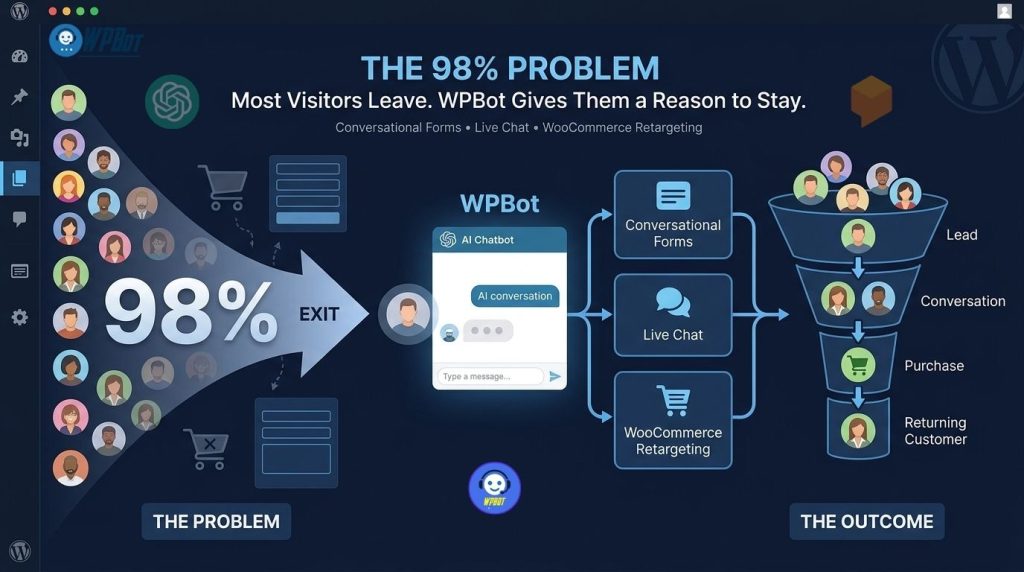
WPBot turns a passive WordPress website into an interactive conversion layer by combining AI conversations, Conversational Forms, Live Chat, WooCommerce assistance, and behavioral retargeting. WPBot can engage visitors before abandonment, capture structured lead information, escalate high-intent conversations to humans, and re-engage qualifying WooCommerce visitors after checkout abandonment.
WPBot helps reduce visitor abandonment by giving WordPress visitors multiple ways to continue the buying journey: WPBot Conversational Forms capture information without forcing visitors through traditional forms, WPBot Live Chat provides automated or human-assisted support when objections appear, and WPBot WooCommerce retargeting can re-engage visitors who abandon shopping or checkout sessions.
Why Does the “98% Problem” Matter More Than Getting More Traffic?
The 98% Problem describes a familiar conversion gap: most website visitors arrive, browse, hesitate, and leave without becoming customers or identifiable leads.
The exact percentage is not universal. WPBot uses the 98% concept as a practical conversion framework rather than a claim that exactly 98% of every website’s visitors abandon without buying.
A website can receive 10,000 monthly visitors and still generate disappointing revenue if the website fails to answer questions, capture intent, resolve objections, or bring abandoning shoppers back.
For example, consider a WooCommerce store receiving 10,000 monthly sessions.
If 2% of sessions produce purchases, the store generates 200 orders.
If the average order value is $75, monthly revenue from those orders equals:
200 × $75 = $15,000
The remaining 9,800 sessions represent potential demand that did not immediately become purchases.
WPBot cannot magically convert every abandoned visitor. WPBot can create additional intervention points where visitors can ask questions, submit information, receive human assistance, or encounter retargeting messages before the buying journey completely disappears.
|
Website Stage |
Visitor Behavior |
WPBot Intervention |
|
Discovery |
Visitor browses |
WPBot starts contextual conversation |
|
Research |
Visitor has questions |
WPBot AI answers questions |
|
Qualification |
Visitor shows buying intent |
WPBot Conversational Forms collect information |
|
Objection |
Visitor needs reassurance |
WPBot Live Chat provides automated or human support |
|
Purchase |
Visitor shops |
WPBot WooCommerce tools assist product discovery |
|
Abandonment |
Visitor leaves |
WPBot retargeting attempts re-engagement |
|
Analysis |
Business needs insight |
WPBot chat history and analytics reveal conversation patterns |
The important idea is simple: WPBot does not need to replace the website, sales team, contact form, or marketing stack. WPBot adds conversation and intervention to the places where passive pages often lose intent.
Why Does Website Traffic Fail When Visitors Cannot Ask Questions?
A traditional WordPress website follows a passive model.
A visitor reads a page, searches a menu, opens a product page, fills out a form, or leaves.
WPBot changes the interaction model by allowing the visitor to ask a question directly inside the website experience.
WPBot can operate with built-in chatbot functionality or connect with AI services including OpenAI, Gemini, OpenRouter, Dialogflow, and multiple models available through OpenRouter.
The distinction matters because visitors rarely arrive with perfectly structured questions.
A visitor might type:
“Which plan should I choose?”
A static FAQ page forces the visitor to search.
WPBot can turn the question into a conversation.
A visitor might then ask:
“Does the Pro version support multiple websites?”
WPBot can provide relevant information when WPBot has been configured with appropriate website content, knowledge sources, or responses.
WPBot also supports RAG and vector database embeddings, allowing WPBot to work with website content and other structured knowledge sources.
That creates a more useful architecture:
Website traffic → WPBot conversation → visitor intent → relevant answer → next action
The objective is not to make every visitor chat.
The objective is to make sure high-intent visitors have somewhere to go when a static page stops being sufficient.
Why Are Traditional Contact Forms Losing High-Intent Leads?
Traditional contact forms often create unnecessary friction.
A visitor sees:
- Name
- Phone
- Company
- Subject
- Message
- Additional fields
WPBot Conversational Forms replace the large static form experience with a step-by-step conversational interaction.
WPBot Conversational Forms provide a visual drag-and-drop builder for creating contact forms, booking forms, surveys, lead-generation forms, and custom information collection workflows.
The difference is psychological as much as technical.
A static form says:
“Complete these fields.”
WPBot Conversational Forms can say:
“Let’s start with what you need.”
That smaller interaction can make a complex lead-generation process feel easier.
How Can WPBot Conversational Forms Capture Leads Without Creating Form Fatigue?
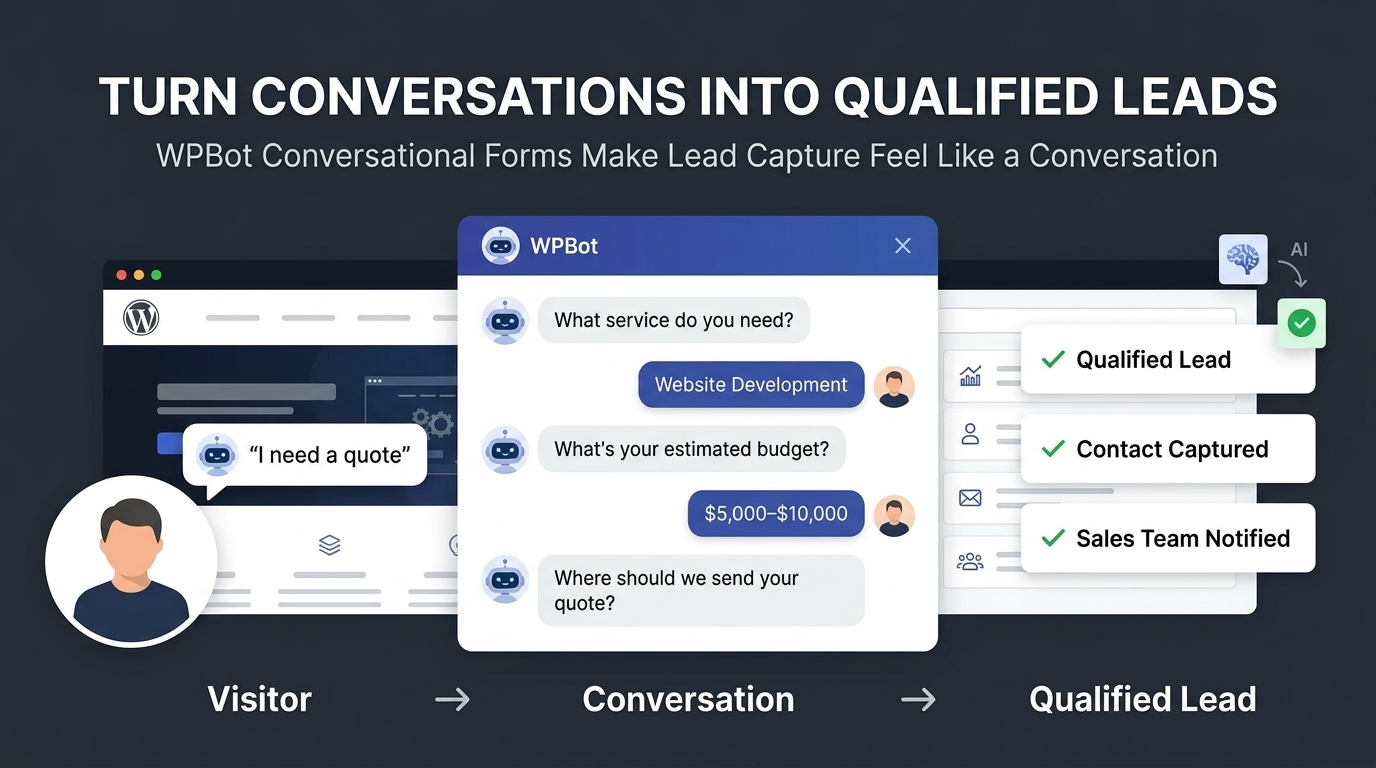
WPBot Conversational Forms can divide information collection into smaller conversational steps.
Instead of requesting eight fields simultaneously, WPBot can structure a sequence around the visitor’s immediate answer.
For example:
Step 1: WPBot asks what service the visitor needs.
Step 2: WPBot asks about the project size.
Step 3: WPBot asks about the desired timeline.
Step 4: WPBot asks for contact information.
Step 5: WPBot submits the completed WPBot Conversational Form.
WPBot can therefore collect structured information while maintaining a conversation-like interface.
WPBot Conversational Forms support text fields, selections, checkboxes, HTML content, and other form-building capabilities through the visual builder.
WPBot Conversational Forms can also support booking and appointment-oriented workflows, including Google Calendar scheduling in the Pro feature set.
Which Leads Should WPBot Conversational Forms Capture First?
WPBot Conversational Forms work best when WPBot captures information that directly affects sales qualification.
WPBot Conversational Forms can capture:
- WPBot project requirements: WPBot can ask visitors what product, service, or solution the visitor needs.
- WPBot budget information: WPBot can collect budget ranges to help segment sales inquiries.
- WPBot purchase timeframe: WPBot can ask whether the visitor needs a solution today, this week, or later.
- WPBot contact details: WPBot can collect email addresses and phone numbers after establishing context.
- WPBot appointment requirements: WPBot can guide visitors toward scheduling workflows.
- WPBot qualification answers: WPBot can collect structured responses that help sales teams prioritize leads.
The key is sequencing.
WPBot should not ask for personal information before WPBot has provided enough value to justify the request.
How Does WPBot Turn a Conversational Form Into a Sales Qualification Tool?
A traditional form often produces a lead record.
WPBot Conversational Forms can produce a more structured lead context.
Consider a web agency receiving two inquiries.
Lead A:
“Hi, I need a website.”
Lead B:
“I need a WooCommerce website for approximately 500 products. I need payment integration within 30 days and my budget is $5,000–$8,000.”
WPBot Conversational Forms can be configured to capture information that makes Lead B substantially easier to prioritize.
WPBot therefore turns form completion into a qualification process.
The formula becomes:
WPBot conversation → WPBot qualification → WPBot structured data → sales follow-up
That is much more useful than simply collecting an email address.
Why Does Live Chat Matter When WPBot Already Has AI?
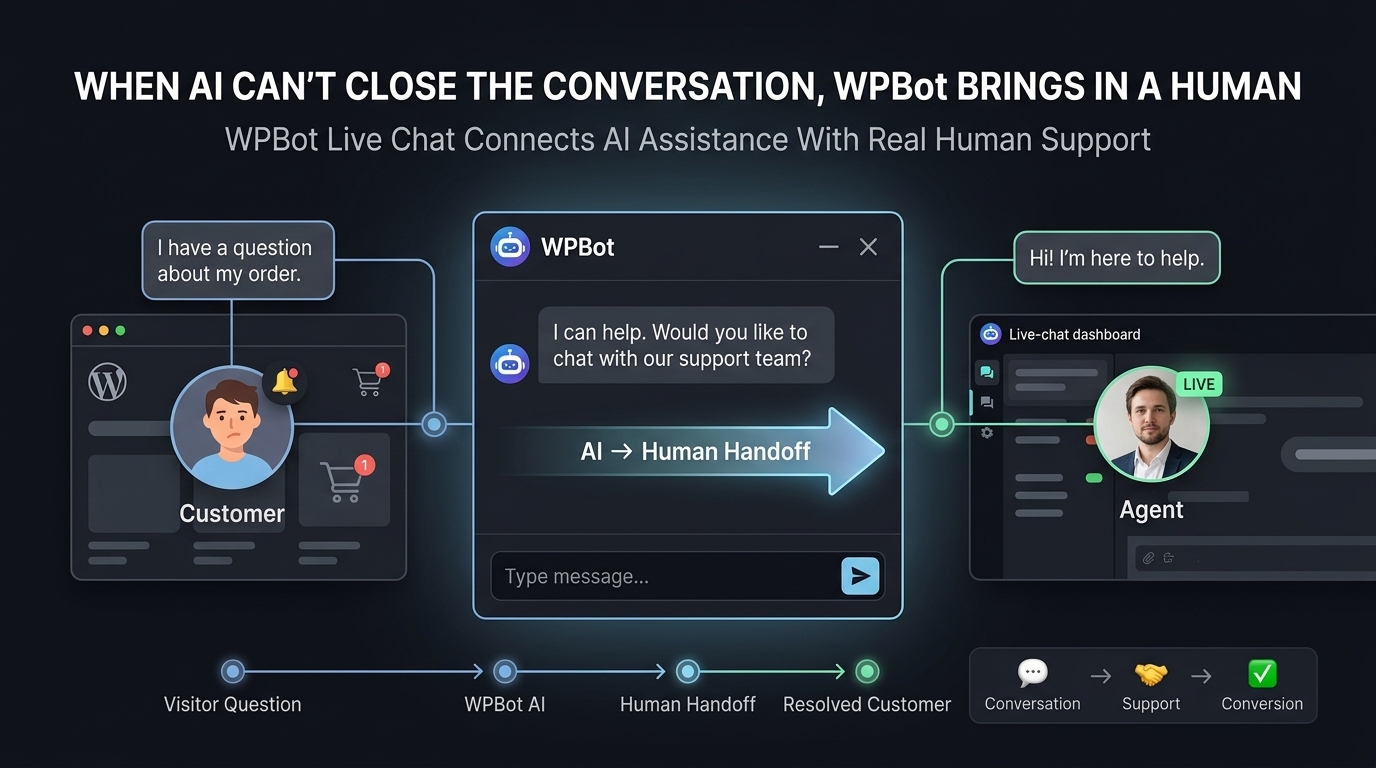
AI answers are useful, but AI should not be the only interaction layer.
Some visitors need a human.
A visitor asking about a product specification may accept an automated answer.
A visitor dealing with a billing issue, complex enterprise requirement, or high-value purchase may prefer a person.
WPBot Pro supports hybrid automation where WPBot can connect automated chatbot interactions with live human support, including support through Slack or the WordPress dashboard.
The architecture becomes:
WPBot AI → identify intent → WPBot Live Chat → human intervention
This prevents a common chatbot failure:
“Please contact support”
Instead, WPBot can create a pathway toward actual assistance.
When Should WPBot Escalate a Visitor to Live Chat?
WPBot Live Chat becomes especially valuable when a visitor demonstrates high commercial or support intent.
WPBot Live Chat can be positioned around:
- WPBot high-value sales inquiries: WPBot can route serious prospects toward human assistance.
- WPBot technical questions: WPBot can provide automated answers first and escalate when human expertise is required.
- WPBot pre-purchase objections: WPBot can help visitors resolve concerns before abandonment.
- WPBot customer support requests: WPBot can handle routine questions while providing a human escalation route.
- WPBot complex WooCommerce issues: WPBot can help visitors reach support when automated product information is insufficient.
The objective is not to make humans disappear.
The objective is to make human intervention more selective.
How Can WPBot Combine AI Support With Human Support?
WPBot creates a useful division of labor.
WPBot handles repetitive questions.
WPBot identifies intent.
WPBot collects structured information.
WPBot escalates conversations requiring human attention.
WPBot Live Chat gives human operators a path into conversations that need personal assistance.
This model can reduce the number of conversations that require manual attention without forcing every visitor into an automated dead end.
WPBot also supports chat history and analytics features that can help businesses inspect previous interactions and identify recurring customer questions.
Why Is WooCommerce Abandonment a Different Problem?
Lead-generation abandonment and eCommerce abandonment are not identical.
A lead may leave because the visitor is undecided.
A WooCommerce shopper may leave after viewing a product, adding an item to the cart, entering checkout information, or reaching a payment step.
The commercial intent can therefore be significantly stronger.
WPBot Pro includes WooCommerce functionality designed to support product discovery and conversion workflows, including product information and cart-related interactions. WPBot also provides offsite retargeting capabilities for abandoned WooCommerce sessions.
That creates a second chance after the visitor leaves.
How Can WPBot WooCommerce Retargeting Recover Abandoned Buying Intent?
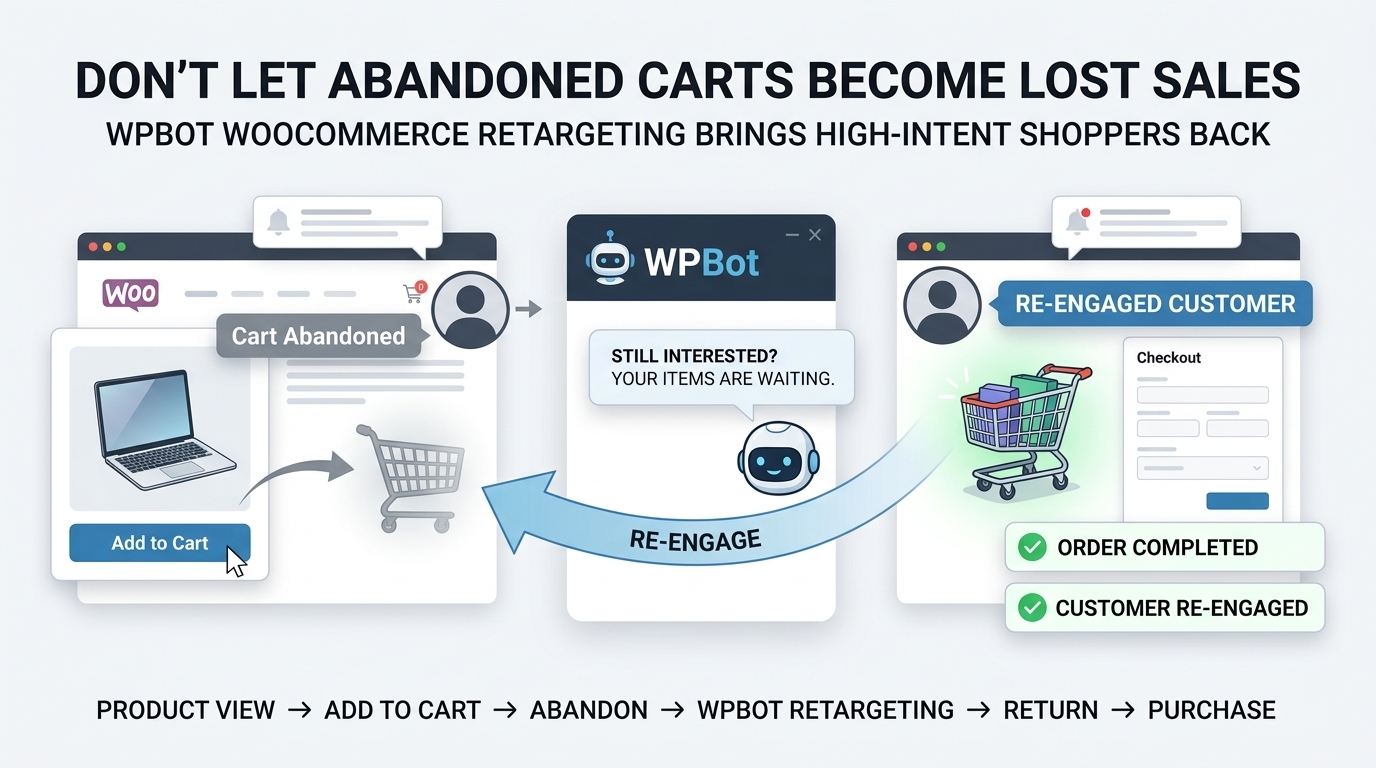
WPBot WooCommerce retargeting works around a simple problem:
A visitor can disappear before the transaction is completed.
WPBot can use retargeting mechanisms to bring attention back to the abandoned shopping journey.
WPBot Pro supports offsite retargeting for WooCommerce abandonment and onsite behavioral triggers such as exit intent and scroll-based interactions.
The workflow can look like:
Product visit → Cart activity → Checkout → Abandonment → WPBot retargeting → Return visit → Purchase
WPBot does not need to assume that every abandoned visitor is lost forever.
WPBot can treat abandonment as a signal that the visitor may need another opportunity to continue.
What Does the WPBot WooCommerce Conversion Loop Look Like?
The strongest WPBot implementation connects multiple stages instead of treating each feature as an isolated widget.
|
Stage |
WPBot Feature |
Primary Objective |
|
Product research |
WPBot AI Chat |
Answer questions |
|
Product selection |
WPBot WooCommerce integration |
Help shoppers evaluate products |
|
Lead qualification |
WPBot Conversational Forms |
Capture structured information |
|
Purchase objection |
WPBot Live Chat |
Connect with human support |
|
Cart abandonment |
WPBot Retargeting |
Re-engage visitors |
|
Post-conversion |
WPBot support |
Handle customer questions |
|
Optimization |
WPBot analytics |
Identify recurring problems |
WPBot becomes more valuable when the stages are connected.
WPBot Conversational Forms capture intent.
WPBot Live Chat resolves complex objections.
WPBot WooCommerce functionality supports purchase decisions.
WPBot retargeting addresses abandonment.
WPBot analytics can then help identify where visitors repeatedly struggle.
How Much Revenue Could WPBot Recover Without Increasing Traffic?
ROI calculations should use actual website numbers rather than generic promises.
Consider a WooCommerce store with:
- 10,000 monthly sessions
- 2% completed purchase rate
- 200 monthly orders
- $75 average order value
- $15,000 monthly revenue
Now assume WPBot-assisted retargeting and conversion interventions generate only 20 additional orders per month.
The additional revenue becomes:
20 × $75 = $1,500/month
Annualized additional revenue becomes:
$1,500 × 12 = $18,000/year
That does not mean WPBot will automatically generate 20 additional orders.
The example demonstrates the correct calculation method.
A business should measure:
Incremental WPBot-attributed revenue ÷ WPBot operating cost = WPBot ROI
A second example can use lead generation.
Suppose WPBot Conversational Forms generate 100 additional qualified leads per month.
Suppose the sales team closes 8% of those leads.
That produces:
100 × 8% = 8 additional customers
If average customer value equals $500:
8 × $500 = $4,000 additional monthly customer value
Again, WPBot should be evaluated against actual attribution data rather than assumed conversion rates.
Why Should WPBot Replace “More Traffic” With “More Intent”?
Traffic acquisition is expensive.
SEO requires content.
Paid advertising requires budget.
Social media requires attention.
Partnerships require relationships.
WPBot does not replace those acquisition channels.
WPBot gives existing traffic another conversion mechanism.
A useful growth equation is:
Revenue = Traffic × Conversion Rate × Average Order Value
WPBot primarily targets the conversion portion of that equation.
If traffic remains constant while conversion improves, revenue can increase without requiring proportional traffic growth.
For example:
10,000 visitors × 2% × $75 = $15,000
Increasing conversion from 2% to 2.3% produces:
10,000 × 2.3% × $75 = $17,250
The difference equals:
$2,250 additional monthly revenue
WPBot should therefore be viewed as a conversion infrastructure layer, not merely as another traffic-generation tool.
Why Does WPBot Need More Than a Generic AI Prompt?
Generic AI can answer questions.
Useful WordPress automation requires context, actions, structured inputs, integrations, and escalation.
WPBot supports multiple AI providers, RAG/vector database approaches, conversational forms, WooCommerce functionality, retargeting, webhooks, and live support capabilities.
WPBot also includes AI Actions designed for structured workflows such as quote requests, lead qualification, real-estate inquiries, SaaS demos, wholesale inquiries, admissions qualification, and other use cases.
The distinction is important:
AI response = information
WPBot workflow = information + action
That difference makes WPBot more useful for conversion-oriented WordPress websites.
How Can WPBot Use RAG Without Turning Every Answer Into a Hallucination Risk?
WPBot supports RAG and vector database embeddings for website content and other knowledge sources.
RAG can reduce the dependence on generic model knowledge by retrieving relevant information from configured sources before generating an answer.
A practical WPBot architecture looks like:
Visitor question → WPBot retrieval → relevant knowledge → AI generation → WPBot response
For a WooCommerce store, WPBot can use product and website information to help answer questions about available offerings.
For a documentation site, WPBot can use indexed website information.
For a business, WPBot can use structured company information and support material.
The quality of WPBot answers still depends on knowledge-source quality, retrieval configuration, prompts, model selection, and ongoing maintenance.
Why Should WPBot Use Multiple AI Providers Instead of Locking a Website to One Model?
Different AI models have different pricing, latency, capabilities, and output characteristics.
WPBot supports OpenAI, Google Gemini, OpenRouter, Dialogflow, and models available through OpenRouter, including providers and models such as DeepSeek, Mistral, Claude, Grok, and others.
That gives administrators more flexibility.
|
WPBot AI Architecture |
Cost Control |
Model Flexibility |
Operational Consideration |
|
WPBot + OpenAI |
Depends on selected model |
High |
Monitor token consumption |
|
WPBot + Gemini |
Depends on selected model/API plan |
High |
Monitor API quotas |
|
WPBot + OpenRouter |
High provider/model choice |
Very high |
Manage provider routing |
|
WPBot + DeepSeek through supported routing |
Model-dependent |
High |
Evaluate latency and quality |
|
WPBot built-in functionality |
Potentially lower external AI cost |
Lower AI capability |
Best for deterministic workflows |
WPBot administrators should select models based on task complexity rather than automatically sending every conversation to the most expensive model.
WPBot can use deterministic functionality for simple workflows and external AI models where natural-language reasoning provides meaningful value.
How Can WPBot Reduce the Cost of Human Support?
Support teams often spend time answering repetitive questions.
WPBot can handle routine questions before a human agent becomes involved.
Suppose a support team receives 1,000 monthly questions.
If WPBot successfully handles 400 routine questions without human intervention, the support team has fewer conversations requiring manual handling.
If each manually handled interaction consumes an average of 6 minutes, the theoretical workload avoided becomes:
400 × 6 = 2,400 minutes
2,400 ÷ 60 = 40 hours
That does not automatically equal 40 hours of guaranteed savings because real support workflows include escalation, review, and operational overhead.
The calculation provides a framework for measuring WPBot’s actual support impact.
Why Is WPBot More Powerful When Conversational Forms, Live Chat, and Retargeting Work Together?
WPBot Conversational Forms, WPBot Live Chat, and WPBot WooCommerce Retargeting solve different points in the same conversion journey.
WPBot Conversational Forms address capture.
WPBot Live Chat addresses objection resolution.
WPBot WooCommerce Retargeting addresses re-engagement.
The combined funnel becomes:
Visitor → WPBot conversation → WPBot qualification → WPBot assistance → purchase → WPBot re-engagement
WPBot therefore creates multiple intervention points rather than relying on one chatbot popup to solve every conversion problem.
What Should a High-Converting WPBot Setup Actually Look Like?
A practical WPBot implementation should start with visitor intent rather than features.
WPBot Setup 1 — Discovery: WPBot opens an optional conversation and offers useful starting paths.
WPBot Setup 2 — Knowledge: WPBot uses configured website content and RAG where appropriate to answer product or service questions.
WPBot Setup 3 — Qualification: WPBot Conversational Forms collect information after visitor intent becomes clear.
WPBot Setup 4 — Human Escalation: WPBot Live Chat provides a route to human assistance for complex or high-value conversations.
WPBot Setup 5 — WooCommerce: WPBot helps shoppers discover products and navigate purchase-related questions.
WPBot Setup 6 — Retargeting: WPBot retargeting addresses qualifying abandonment behavior.
WPBot Setup 7 — Measurement: WPBot analytics and conversation histories reveal recurring questions and conversion friction.
The setup should remain simple.
WPBot should intervene when intervention is useful, not interrupt every visitor.
How Does WPBot Compare With a Typical SaaS Chatbot?
WPBot has a different ownership model from many hosted chatbot SaaS products.
WPBot runs inside WordPress, while external SaaS chatbot products generally operate as separate hosted services.
|
Capability |
WPBot |
Typical SaaS Chatbot |
|
WordPress-native deployment |
WPBot: Yes |
Typical SaaS: Usually external embed |
|
Conversational Forms |
WPBot: Native/addon capability |
Depends on provider |
|
Live human escalation |
WPBot: Supported |
Depends on provider |
|
WooCommerce integration |
WPBot: Supported |
Depends on provider |
|
Retargeting |
WPBot Pro: Supported |
Depends on provider |
|
Multiple AI providers |
WPBot: Supported |
Depends on provider |
|
RAG/vector knowledge |
WPBot: Supported |
Usually plan-dependent |
|
External API cost |
WPBot: Depends on selected AI provider |
Depends on SaaS plan/provider |
|
Hosting model |
WPBot: WordPress environment |
Typical SaaS: Vendor infrastructure |
|
Agency white-label capability |
WPBot Pro: Available |
Depends on provider |
WPBot’s WordPress-native architecture can be particularly attractive to agencies and WordPress businesses that want centralized control over chatbot deployment.
WPBot Pro also provides agency-oriented capabilities such as white labeling and multi-site deployment options.
Why Should Developers Treat WPBot as a Conversion System Instead of a Chat Widget?
A chat widget is easy to ignore.
A conversion system connects user intent to business actions.
WPBot can connect:
Question → Answer
Question → Lead
Question → Appointment
Question → Human Support
Product Interest → Cart
Cart Abandonment → Retargeting
Conversation → Analytics
WPBot therefore belongs closer to the website’s conversion architecture than to a simple decorative chatbot layer.
The strongest WPBot deployments should be designed around measurable business events.
What Metrics Should Developers Track After Installing WPBot?
WPBot implementation should produce measurable hypotheses.
WPBot teams should monitor:
- WPBot conversation-start rate: Percentage of eligible visitors who initiate a WPBot conversation.
- WPBot completion rate: Percentage of WPBot Conversational Forms completed after starting.
- WPBot qualified-lead rate: Percentage of WPBot-generated leads meeting defined qualification criteria.
- WPBot human-escalation rate: Percentage of conversations requiring WPBot Live Chat assistance.
- WPBot assisted-conversion rate: Percentage of purchases associated with WPBot interactions.
- WPBot abandoned-cart recovery: Purchases attributed to WPBot WooCommerce retargeting.
- WPBot cost per qualified lead: WPBot operating costs divided by qualified WPBot leads.
- WPBot AI cost per conversation: External API spending divided by WPBot AI conversations.
- WPBot support deflection: Routine support interactions resolved by WPBot without human intervention.
The metrics should be compared against a baseline.
Without a baseline, WPBot analytics can show activity but cannot prove incremental business value.
FAQ
The '98% Problem' refers to the common issue where most website visitors browse and leave without becoming customers or identifiable leads. It highlights the conversion gap where only a small percentage convert, and many visitors abandon the site without completing a purchase or lead submission.
WPBot reduces visitor abandonment by engaging visitors through AI conversations, conversational forms that capture information without traditional forms, live chat that provides automated or human-assisted support, and WooCommerce retargeting that re-engages visitors who abandon shopping or checkout sessions.
WPBot Conversational Forms replace large static forms with step-by-step conversational interactions. They capture information in smaller, easier steps, making the lead-generation process feel less daunting and more natural compared to traditional forms that request multiple fields at once.
While AI can handle many routine questions, some visitors need human assistance for complex issues, billing problems, or high-value purchases. WPBot supports hybrid automation by escalating conversations requiring human attention through live chat, ensuring visitors receive appropriate support without encountering dead ends.
WPBot WooCommerce Retargeting uses offsite retargeting mechanisms and onsite behavioral triggers like exit intent and scroll-based interactions to re-engage visitors who abandon their shopping journey before completing a transaction, providing them with another opportunity to return and complete their purchase.
Developers should monitor WPBot conversation-start rate, completion rate of conversational forms, qualified lead rate, human escalation rate, assisted conversion rate, abandoned cart recovery, cost per qualified lead, AI cost per conversation, and support deflection rate to measure WPBot's impact against a baseline.
WPBot connects user intent to business actions by linking questions to answers, leads, appointments, human support, cart interest, retargeting, and analytics. This integration into the website’s conversion architecture makes WPBot a strategic tool for driving measurable business outcomes rather than a simple decorative chatbot.
WPBot supports multiple AI providers including OpenAI, Google Gemini, OpenRouter, Dialogflow, and others, offering flexibility in pricing, latency, capabilities, and output. This allows administrators to select models based on task complexity and manage costs effectively rather than relying on a single AI model.
What Is the Real Solution to the “98% Problem”?
The 98% Problem is not fundamentally a traffic problem.
The 98% Problem is an intent-handling problem.
Visitors leave when visitors cannot find answers, cannot determine the right product, cannot complete a form comfortably, cannot reach support, or abandon a purchase without receiving another reason to return.
WPBot addresses those gaps through three connected mechanisms.
WPBot Conversational Forms capture intent.
WPBot Live Chat resolves complex questions and enables human escalation.
WPBot WooCommerce Retargeting re-engages qualifying abandoned shopping journeys.
The strongest WPBot strategy therefore looks less like:
“Add an AI chatbot to the website.”
The stronger strategy is:
“Give every high-intent visitor a path forward.”
WPBot can answer the question.
WPBot can collect the lead.
WPBot can connect the visitor with a human.
WPBot can assist the WooCommerce purchase.
WPBot can re-engage qualifying abandonment.
WPBot can then provide conversation data that helps the business identify why visitors hesitate in the first place.
That is the real opportunity behind the 98% Problem: WPBot does not need to convert every visitor. WPBot needs to make sure high-intent visitors have fewer reasons to disappear without a next step.