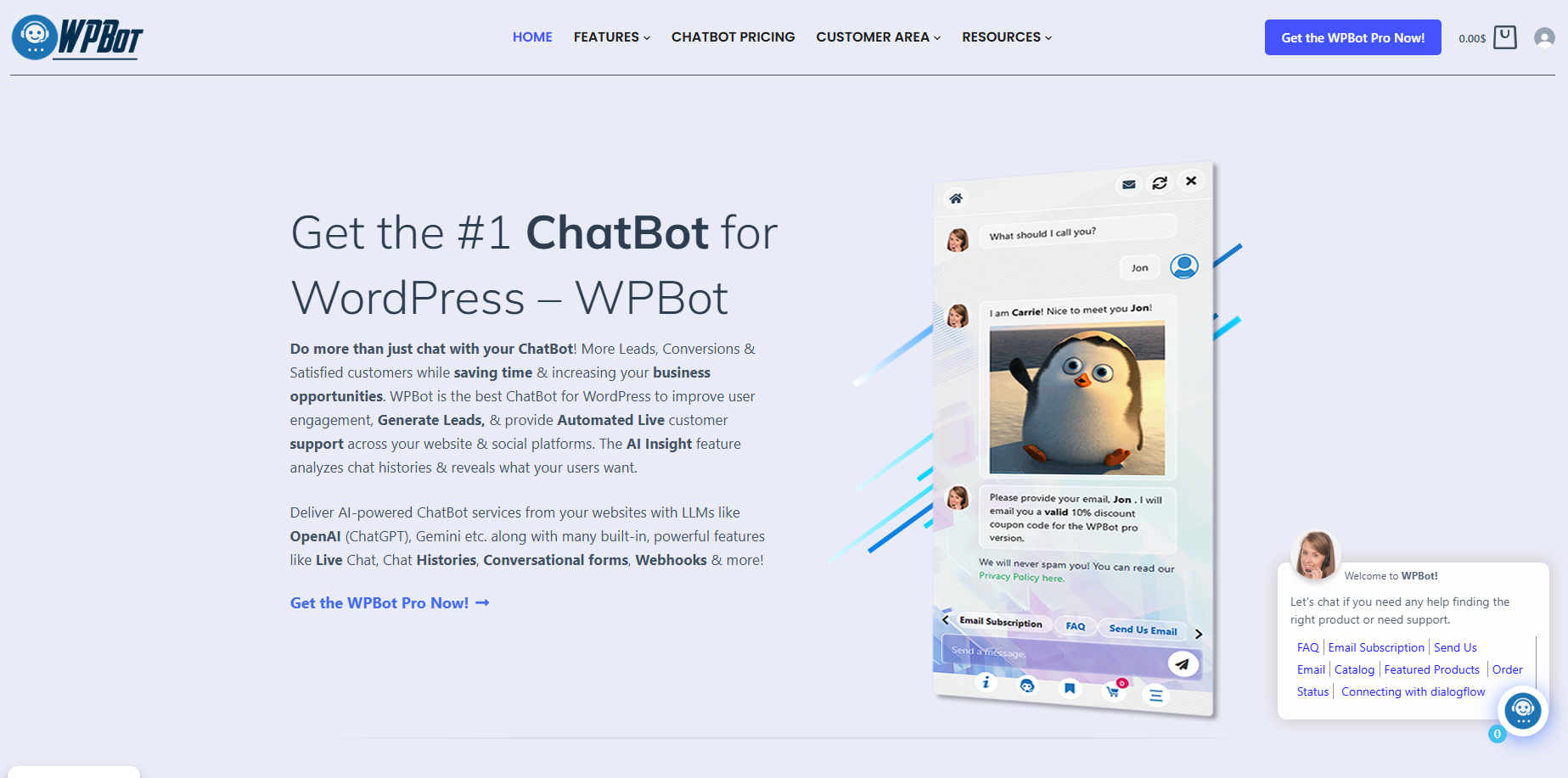
WPBot turns website traffic into conversations that can lead to checkouts by combining AI assistance, Conversational Forms, Live Chat, and WooCommerce Retargeting inside WordPress. WPBot gives visitors a path from question → qualification → human assistance → purchase → re-engagement instead of leaving high-intent visitors alone on a static page.
Why Does Your Website Have Traffic but Still Generate So Few Conversations?
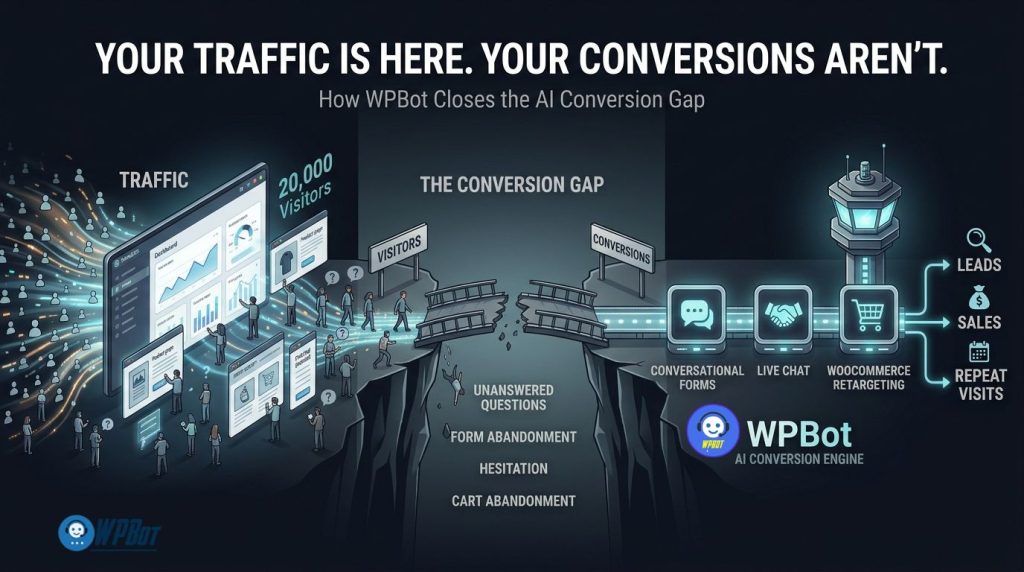
WPBot addresses a conversion gap that analytics dashboards often hide: visitors can arrive, browse several pages, and still leave without asking a question, submitting a form, contacting support, or purchasing.
WPBot treats visitor inactivity as a workflow problem rather than simply a traffic problem. WPBot creates intervention points where visitors can ask questions, submit information, reach a human, receive WooCommerce assistance, or encounter a relevant retargeting message.
WPBot does not need to convert every visitor. WPBot needs to make the next useful action obvious for visitors who already show buying or inquiry intent.
A practical conversion model looks like this:
Traffic → WPBot conversation → WPBot qualification → WPBot assistance → WPBot purchase → WPBot re-engagement
WPBot therefore connects three important conversion mechanisms rather than treating a chatbot as a decorative website widget. WPBot Conversational Forms capture intent, WPBot Live Chat resolves difficult objections, and WPBot WooCommerce Retargeting brings qualifying visitors back into the buying journey.
What Exactly Is the AI Conversion Gap?
WPBot can help explain the AI conversion gap as the distance between visitor attention and visitor action.
WPBot can receive traffic from Google, social media, paid advertising, referrals, email campaigns, and direct visits, but WPBot does not automatically turn every visit into commercial intent.
WPBot becomes useful when a visitor reaches a point such as:
- WPBot: “Which product should I choose?”
- WPBot: “Does this product work with my setup?”
- WPBot: “Can I get a quote?”
- WPBot: “Can somebody answer a technical question?”
- WPBot: “Can I book an appointment?”
- WPBot: “Where is my order?”
- WPBot: “Why should I buy this product instead of another product?”
- WPBot: “I started checkout but I am not ready yet.”
WPBot gives each question a possible next action instead of forcing the visitor to hunt through menus, documentation, contact pages, or static forms.
Why Can More Traffic Actually Make the Conversion Problem Worse?
WPBot exposes a simple problem with traffic-first thinking: more visitors can produce more unanswered questions.
WPBot can help a website process additional visitor intent without requiring every visitor to find a human employee immediately.
Consider a realistic WooCommerce example:
|
Metric |
Before WPBot |
With WPBot Workflow |
|
Monthly visitors |
20,000 |
20,000 |
|
Purchase conversion rate |
1.5% |
1.8% |
|
Monthly orders |
300 |
360 |
|
Average order value |
$50 |
$50 |
|
Monthly revenue |
$15,000 |
$18,000 |
|
Incremental revenue |
— |
$3,000/month |
|
Annualized incremental revenue |
— |
$36,000/year |
WPBot does not guarantee a 1.5% to 1.8% conversion increase because actual results depend on traffic quality, offer quality, product-market fit, UX, pricing, implementation, and visitor intent.
WPBot provides the conversion infrastructure needed to test whether unanswered questions, form friction, support delays, and abandoned purchase journeys are responsible for part of the missed revenue.
Why Are Traditional Contact Forms Losing High-Intent Visitors?
WPBot Conversational Forms attack one of the oldest conversion problems on the web: asking visitors to complete a large static form before receiving any value.
WPBot Conversational Forms can collect information through smaller conversational steps rather than presenting every field simultaneously.
WPBot Conversational Forms can support standard forms, conditional conversations, calculators, appointment workflows, and other structured information-gathering use cases.
A conventional lead form might request:
- WPBot: Name
- WPBot: Email
- WPBot: Phone
- WPBot: Company
- WPBot: Budget
- WPBot: Project type
- WPBot: Message
- WPBot: Preferred contact time
WPBot Conversational Forms can turn the same data collection process into a sequence where each answer determines what happens next.
WPBot Conversational Forms therefore reduce the psychological size of the form even when the underlying database still needs the same structured fields.
How Can WPBot Conversational Forms Capture Better Leads Without Adding More Fields?
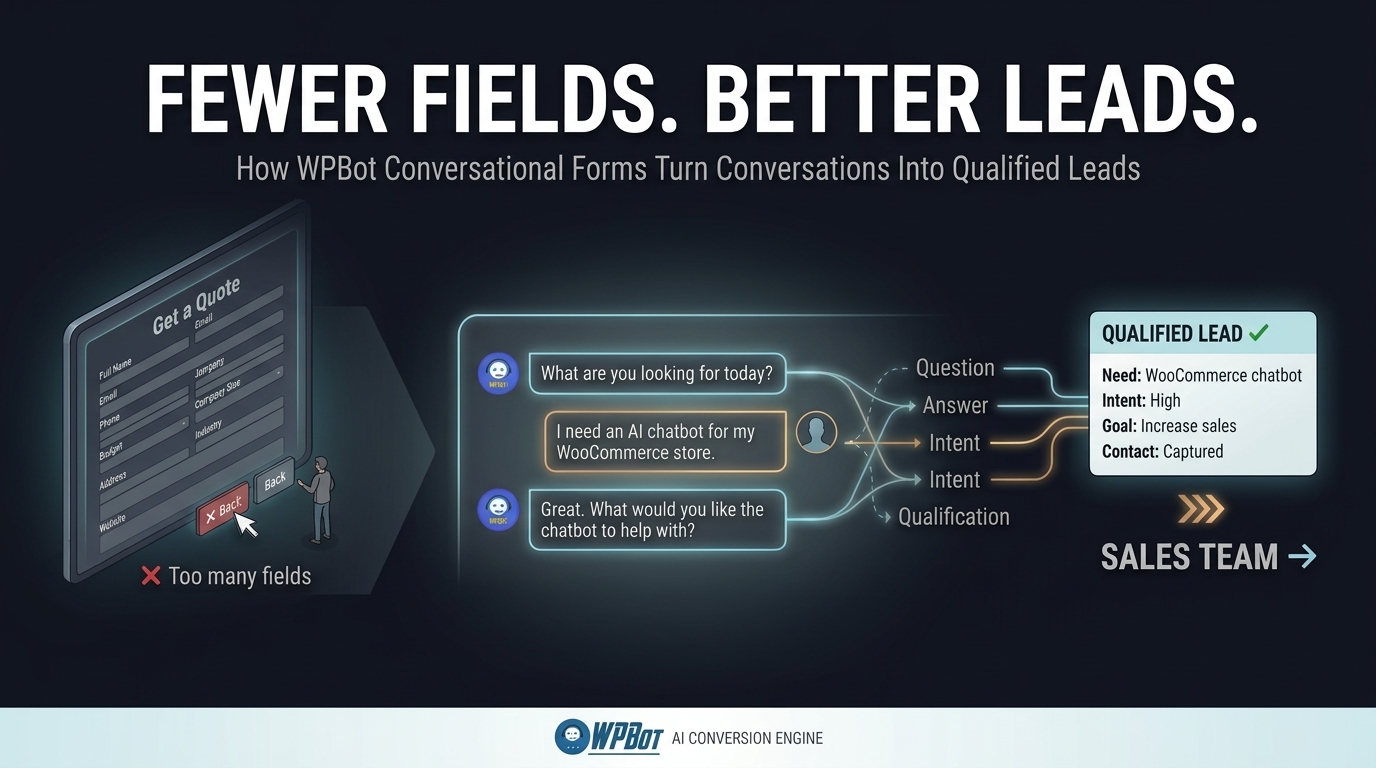
WPBot Conversational Forms can use conditional logic to ask relevant questions based on previous answers.
WPBot Conversational Forms can therefore avoid asking every visitor every question. A visitor interested in a WordPress maintenance package does not necessarily need to see the same questions as a visitor requesting a custom WooCommerce development project.
WPBot Conversational Forms can also use OpenAI-powered responses when configured through the appropriate form settings, with submitted field data and configured instructions sent to OpenAI for processing.
WPBot Conversational Forms can collect structured data while WPBot AI can provide a more natural interaction layer around that structured data.
Why Does Conversational Qualification Beat a Generic “Contact Us” Button?
WPBot Conversational Forms can qualify visitors before the lead reaches a salesperson.
WPBot Conversational Forms can ask about:
- WPBot: Project type
- WPBot: Budget range
- WPBot: Required service
- WPBot: Business size
- WPBot: Product category
- WPBot: Desired timeline
- WPBot: Technical requirements
- WPBot: Contact preference
WPBot Conversational Forms can then send submission data to external services through webhook integrations, allowing WPBot workflows to connect with CRM, automation, email, or other business systems.
Why Does WPBot Need Live Chat After AI Qualification?
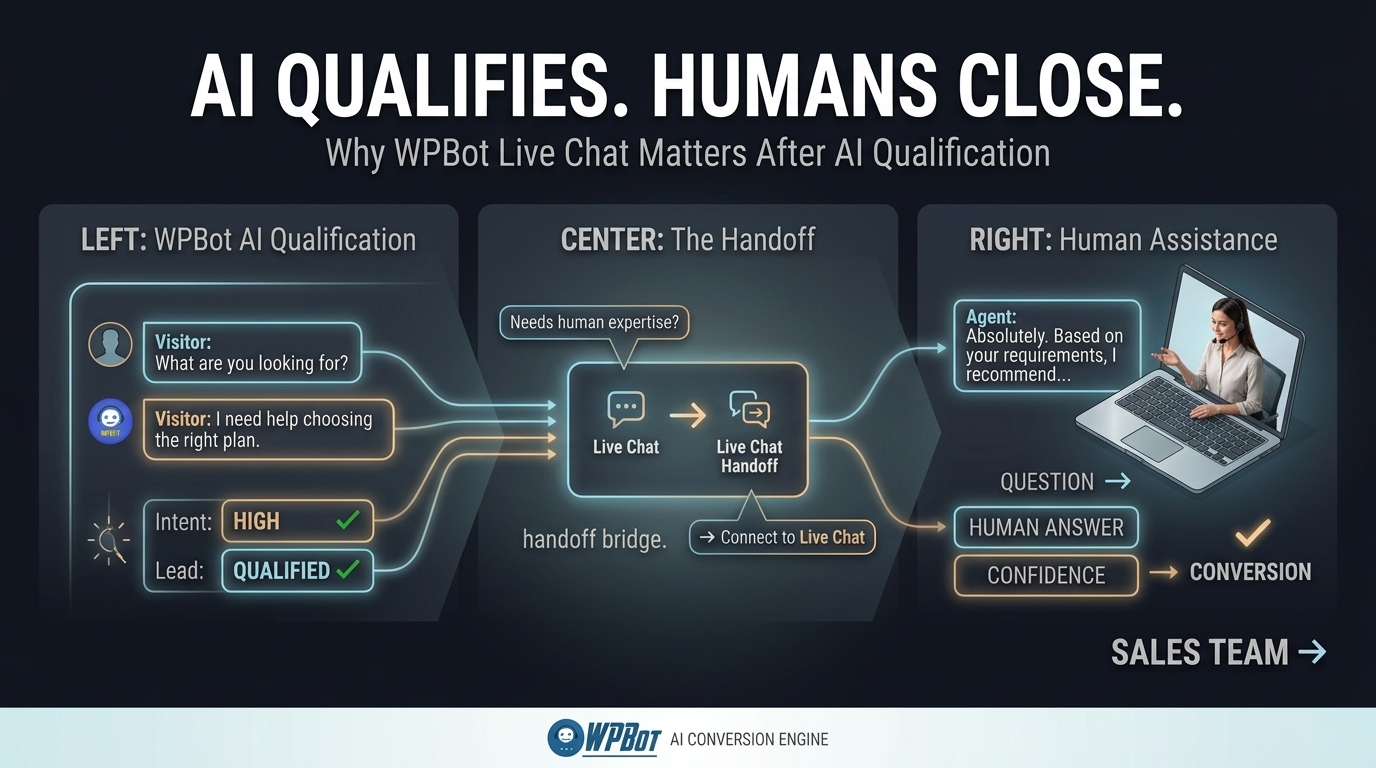
WPBot Live Chat solves a different conversion problem from WPBot Conversational Forms.
WPBot Conversational Forms capture structured intent, while WPBot Live Chat gives visitors a route to human assistance when an automated answer is not enough.
WPBot Live Chat becomes particularly useful when a visitor has already demonstrated commercial intent but needs reassurance before taking action.
Examples include:
- WPBot: A $2,000 software purchase requires technical confirmation.
- WPBot: A WooCommerce customer needs help selecting the correct product size.
- WPBot: A business buyer needs clarification about implementation.
- WPBot: A prospect wants to negotiate a project requirement.
- WPBot: A customer has a billing or account-specific question.
- WPBot: A high-value visitor wants to speak with a human before purchasing.
WPBot can therefore use AI for scalable first-line assistance while WPBot Live Chat provides a human escalation path for conversations requiring judgment.
Why Is Human Escalation Still Important in an AI-First Website?
WPBot cannot replace every human conversation because WPBot cannot reliably eliminate every business-specific exception.
WPBot Live Chat gives businesses a practical hybrid architecture:
WPBot AI → WPBot qualification → WPBot human escalation
WPBot AI can handle repetitive questions.
WPBot Conversational Forms can capture structured information.
WPBot Live Chat can connect high-intent visitors with human support.
WPBot chat sessions can also provide historical conversation context, which helps human agents understand what a visitor has already asked. WPBot documentation includes Live Chat functionality and chat-session capabilities as part of the broader WPBot system.
How Can WPBot Reduce the “Wait for a Reply” Conversion Problem?
WPBot reduces the gap between visitor intent and business response by allowing automation to operate before a human agent becomes available.
WPBot can answer routine questions immediately.
WPBot Conversational Forms can collect information immediately.
WPBot Live Chat can provide human assistance when an agent is available.
WPBot therefore creates a layered response system instead of forcing every visitor into an email queue.
A useful implementation can look like:
|
Visitor Situation |
WPBot Response |
|
Simple FAQ |
WPBot AI answer |
|
Product question |
WPBot product assistance |
|
Lead qualification |
WPBot Conversational Form |
|
Complex sales objection |
WPBot Live Chat |
|
Human support request |
WPBot Live Chat escalation |
|
Abandoned purchase |
WPBot Retargeting |
|
Returning visitor |
WPBot contextual engagement |
WPBot makes the conversion path more resilient because different visitor situations can receive different responses.
Why Does WooCommerce Need More Than a Product Search Box?
WPBot WooCommerce integration can help visitors browse products, search by category, check availability, and receive store-related answers through natural conversation.
WPBot WooCommerce assistance becomes more valuable when a customer does not know the exact product name.
A customer might ask:
“I need a lightweight laptop for university work under $800.”
WPBot can use the conversation to move from vague intent toward product discovery.
WPBot can also help answer questions that block purchase decisions.
Examples include:
- WPBot: Product compatibility
- WPBot: Product category
- WPBot: Availability
- WPBot: Product selection
- WPBot: Buying questions
- WPBot: Store information
- WPBot: Order-related questions
WPBot therefore turns WooCommerce product discovery into an interactive decision process rather than relying entirely on filters and search boxes.
Why Does WooCommerce Retargeting Matter When the Visitor Already Left?
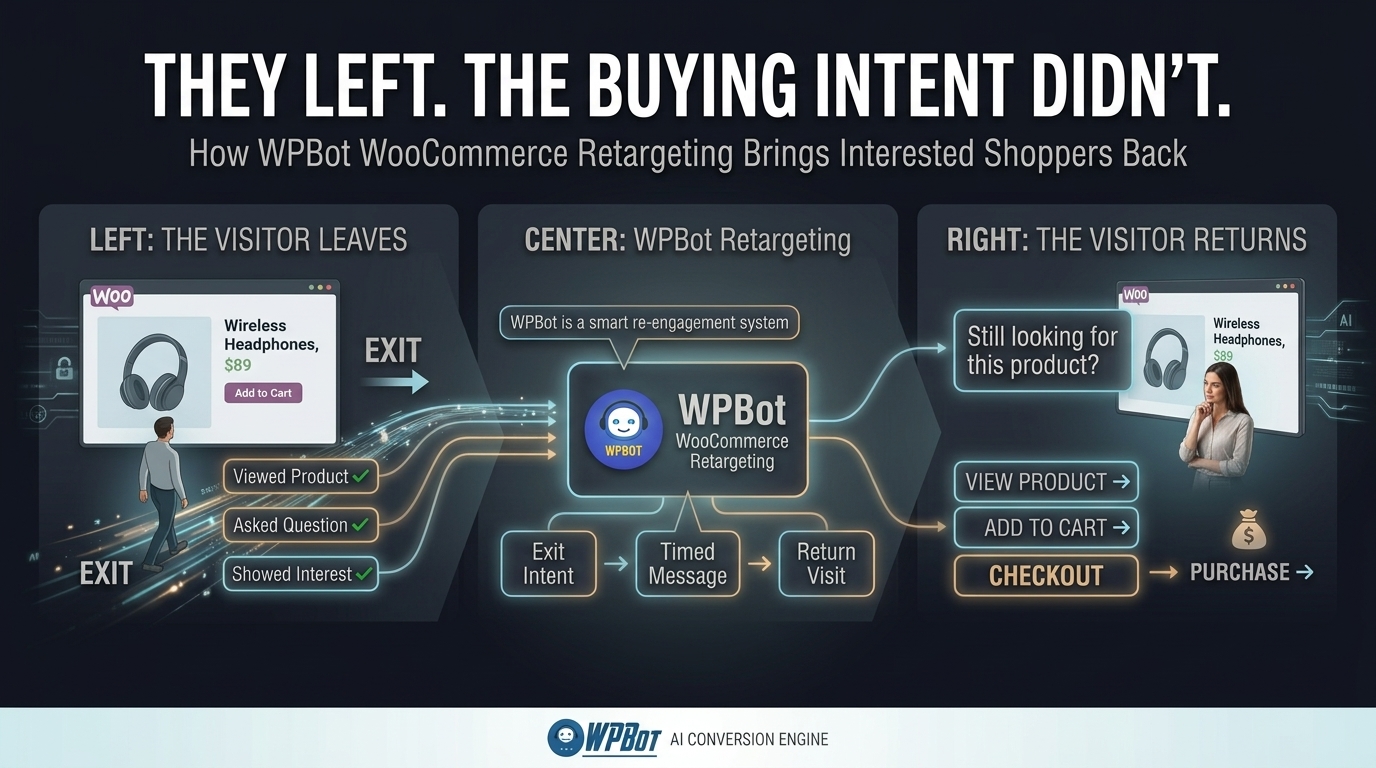
WPBot WooCommerce Retargeting addresses the part of the conversion journey that happens after hesitation.
WPBot retargeting can trigger messages based on visitor behavior such as exit intent, scrolling, elapsed time, and checkout-related activity.
WPBot Retargeting can therefore create a second opportunity to address hesitation.
A visitor might leave because of:
- WPBot: Unclear pricing
- WPBot: Shipping uncertainty
- WPBot: Product-selection anxiety
- WPBot: Missing technical information
- WPBot: Lack of trust
- WPBot: Checkout hesitation
- WPBot: Need for a discount
- WPBot: Need for human assistance
WPBot Retargeting can place a relevant message in front of the visitor before the visitor fully disengages.
How Can WPBot Retargeting Intervene Without Becoming an Annoying Popup?
WPBot Retargeting should be based on intent signals rather than aggressive repetition.
WPBot Retargeting supports triggers such as exit intent, scroll behavior, and delayed messages, with configuration options for timing and showing messages once per visit.
A sensible WPBot implementation can use different messages for different moments.
|
Trigger |
WPBot Message Strategy |
|
Exit intent |
WPBot offers help before departure |
|
50–70% scroll |
WPBot offers product guidance |
|
10–30 seconds |
WPBot offers assistance after engagement |
|
Checkout interaction |
WPBot addresses purchase hesitation |
|
Product interaction |
WPBot offers product-specific help |
WPBot Retargeting becomes more useful when the message answers a likely objection instead of simply shouting a discount.
Why Should WPBot Retargeting Connect With WooCommerce Intent?
WPBot WooCommerce Retargeting becomes stronger when retargeting messages reflect the visitor’s shopping context.
WPBot can use WooCommerce functionality alongside chatbot interactions to create a more commerce-oriented customer journey.
For example, a visitor browsing running shoes may need sizing help rather than a generic “10% OFF” popup.
WPBot can make the next interaction about the visitor’s problem rather than the business’s promotional calendar.
That difference matters because conversion friction is often informational rather than financial.
How Do the Three WPBot Conversion Pillars Work Together?
WPBot Conversational Forms, WPBot Live Chat, and WPBot WooCommerce Retargeting solve three different moments in the same conversion journey.
|
Conversion Problem |
WPBot Pillar |
Primary Job |
|
Visitor wants to engage |
WPBot Conversational Forms |
Capture and qualify intent |
|
Visitor has a difficult objection |
WPBot Live Chat |
Provide human assistance |
|
Visitor hesitates or abandons |
WPBot WooCommerce Retargeting |
Re-engage the visitor |
|
Visitor needs product help |
WPBot WooCommerce |
Guide product discovery |
|
Visitor needs structured follow-up |
WPBot Webhooks |
Send data to external workflows |
WPBot therefore works best as a connected workflow rather than three isolated features.
WPBot Conversational Forms can capture the lead.
WPBot Live Chat can resolve the objection.
WPBot WooCommerce Retargeting can bring the visitor back.
WPBot WooCommerce functionality can support product discovery during the buying process.
Why Is the AI Conversion Gap Really an Intent Gap?
WPBot demonstrates why traffic numbers alone cannot explain conversion performance.
WPBot can help identify four different visitor states:
- WPBot: Low-intent visitor who is browsing.
- WPBot: Information-seeking visitor who needs an answer.
- WPBot: High-intent visitor who needs reassurance.
- WPBot: Returning visitor who previously abandoned an action.
WPBot should not treat all four visitor states identically.
WPBot can provide lightweight assistance to low-intent visitors.
WPBot Conversational Forms can qualify information-seeking visitors.
WPBot Live Chat can protect high-intent conversations.
WPBot Retargeting can re-engage returning or abandoning visitors.
How Should Developers Measure Whether WPBot Is Actually Improving Conversion?
WPBot should be measured using business events rather than chatbot message counts alone.
Useful WPBot metrics include:
|
WPBot Metric |
Example Measurement |
|
WPBot conversations |
2,000/month |
|
WPBot qualified conversations |
600/month |
|
WPBot Conversational Form submissions |
250/month |
|
WPBot Live Chat escalations |
120/month |
|
WPBot assisted purchases |
90/month |
|
WPBot recovered purchase opportunities |
35/month |
|
Average order value |
$75 |
|
WPBot recovered revenue |
$2,625/month |
WPBot ROI can then be calculated with a practical formula:
WPBot ROI = (Incremental Gross Profit + Support Cost Savings − WPBot Operating Cost) ÷ WPBot Operating Cost × 100
WPBot ROI analysis should use incremental profit rather than gross revenue whenever possible.
WPBot ROI analysis should also separate assisted conversions from conversions that would probably have happened without WPBot.
Why Does WPBot Make More Sense Than Adding Another SaaS Subscription?
WPBot runs within the WordPress environment and combines multiple conversion capabilities around the WordPress website.
WPBot can provide Conversational Forms, Live Chat, WooCommerce functionality, retargeting, webhook integrations, chat sessions, and AI integrations from one WordPress-oriented system.
|
Capability |
WPBot |
Typical SaaS Chatbot |
|
WordPress-native deployment |
WPBot: Yes |
Typical SaaS: External service |
|
Conversational Forms |
WPBot: Yes |
SaaS: Depends on provider |
|
Live Chat |
WPBot: Yes |
SaaS: Often separate tier/module |
|
WooCommerce integration |
WPBot: Yes |
SaaS: Depends on connector |
|
Retargeting |
WPBot: Yes |
SaaS: Depends on plan |
|
Webhooks |
WPBot: Yes |
SaaS: Usually available by tier |
|
AI provider usage |
WPBot: Configurable |
SaaS: Provider controlled by vendor |
|
Chat data storage |
WPBot: WordPress database for WPBot chat sessions |
SaaS: Vendor infrastructure |
|
Monthly SaaS dependency |
WPBot: Core plugin does not require a mandatory SaaS chatbot subscription |
SaaS: Common model |
WPBot does not eliminate third-party AI costs when external AI providers are used.
WPBot documentation explicitly notes that OpenAI and Dialogflow are third-party services that charge for usage.
How Can Developers Control WPBot AI API Costs?
WPBot developers should treat AI usage as an application-level variable rather than assuming every conversation requires maximum-token generation.
WPBot can reduce unnecessary AI expenditure by using deterministic responses for predictable questions where appropriate and reserving external AI calls for conversations that actually require generative reasoning.
WPBot documentation includes Simple Text Responses specifically as a lower-complexity alternative to OpenAI or Dialogflow for predefined answers.
A sensible WPBot cost-control architecture can use:
- WPBot: Static responses for predictable FAQs.
- WPBot: Conversational Forms for structured data collection.
- WPBot: AI calls for natural-language questions.
- WPBot: RAG or configured knowledge sources for grounded answers.
- WPBot: Human Live Chat for high-value exceptions.
- WPBot: Retargeting for behavioral intervention.
WPBot therefore does not need to send every visitor interaction through an expensive AI model.
How Does WPBot Handle Data When Developers Connect OpenAI or Other AI Providers?
WPBot documentation states that WPBot chat session data is stored in the site’s WordPress database and is not sent to WPBot’s own servers. WPBot also states that when a site owner connects a third-party service such as OpenAI or Dialogflow, user queries are sent directly to the configured third-party API service.
WPBot therefore creates an important architectural distinction between WPBot storage and third-party AI processing.
WPBot developers should document exactly which data fields are sent externally.
WPBot developers should also avoid sending unnecessary personal information to AI providers.
WPBot developers should apply data minimization to Conversational Forms, Live Chat transcripts, WooCommerce interactions, and webhook payloads.
What Happens When WPBot Sends Conversational Form Data Through a Webhook?
WPBot can send Conversational Form submission data to a configured webhook endpoint, allowing WPBot to connect form submissions with services such as automation platforms and CRM workflows.
WPBot webhook architecture can therefore look like:
WPBot Form → HTTPS Webhook → Automation/CRM → Sales Workflow
WPBot developers should treat webhook endpoints as public network boundaries.
WPBot developers should use HTTPS, validate incoming data, authenticate webhook requests where the receiving system supports authentication, and avoid putting secrets inside browser-visible JavaScript.
WPBot developers should also design webhook processing to tolerate retries and duplicate submissions.
How Should Developers Think About WPBot Server Resource Overhead?
WPBot server overhead depends on configuration, traffic volume, enabled modules, database activity, external API calls, PHP execution time, hosting resources, and concurrent visitors.
WPBot does not make every visitor request equivalent to a full AI inference request.
WPBot deployments can separate lightweight WordPress operations from slower external AI calls and webhook requests.
WPBot developers should profile real workloads using staging tests and production metrics instead of assuming a fixed CPU or RAM requirement.
WPBot developers using WordPress cron should also understand that WP-Cron is triggered by page-load activity unless a system scheduler is configured. WordPress recommends using a system scheduler for time-sensitive tasks and notes that disabling page-load WP-Cron after configuring a system scheduler can reduce unnecessary resource usage.
How Should Developers Handle OpenAI, Gemini, and DeepSeek Token Billing in WPBot?
WPBot AI cost management should begin with provider-level API budgets and application-level usage controls.
WPBot developers should separate:
- WPBot: Number of AI requests.
- WPBot: Input tokens.
- WPBot: Output tokens.
- WPBot: Model selection.
- WPBot: Maximum response length.
- WPBot: Knowledge retrieval size.
- WPBot: Retry frequency.
- WPBot: User/session rate limits.
WPBot developers connecting OpenAI, Gemini, DeepSeek, or another supported provider should verify the exact model pricing and API capabilities in the provider’s current documentation before deployment.
WPBot developers should avoid presenting third-party API costs as part of the WPBot license price.
WPBot developers should also configure provider-side spending limits, monitoring, logging, and alerts where available.
How Should WPBot Handle GDPR and Personal Data?
WPBot privacy architecture should begin with data classification.
WPBot developers should identify whether a field contains:
- WPBot: Name
- WPBot: Email address
- WPBot: Phone number
- WPBot: Address
- WPBot: Order information
- WPBot: Support conversation
- WPBot: IP-related information
- WPBot: Sensitive customer information
WPBot developers should collect only information necessary for the stated business purpose.
WPBot developers should also document which data remains in the WordPress database and which data leaves the WordPress server through external AI or webhook integrations. WPBot documentation states that WPBot chat-session data is stored in the WordPress database, while connected third-party AI requests are sent directly to those services.
WPBot developers should therefore configure privacy notices, retention rules, access controls, deletion workflows, and third-party processor documentation according to the site’s jurisdiction and legal requirements.
How Should Developers Deal With WPBot Security Patches or Historical Vulnerabilities?
WPBot security evaluation should focus on the exact version deployed rather than vague statements about whether a plugin has ever had a vulnerability.
WPBot developers should maintain a documented patch process that includes:
- WPBot: Current production version.
- WPBot: WordPress compatibility.
- WPBot: PHP compatibility.
- WPBot: Security advisories.
- WPBot: Changelog review.
- WPBot: Staging deployment.
- WPBot: Backup verification.
- WPBot: Regression testing.
- WPBot: Production rollout.
- WPBot: Post-update monitoring.
WPBot developers should never assume that a historical security patch makes every future version safe automatically.
WPBot developers should also follow standard WordPress security practices around capability checks, input validation, nonces, sanitization, escaping, and secure REST API endpoint permissions. WordPress’s Plugin Handbook explicitly identifies these areas as core plugin-security practices.
WPBot developers evaluating a historical vulnerability should verify the affected version range, patched version, vulnerability type, severity, mitigation, and current status from an authoritative advisory or the vendor’s published security information.
How Should WPBot Webhooks Handle Latency?
WPBot webhook latency should be treated as an integration architecture problem.
WPBot should not depend on a slow external system when a visitor is waiting for a conversational response.
WPBot webhook workflows should preferably use:
WPBot → Fast HTTPS Request → Queue/Automation → Background Processing
WPBot developers should distinguish between synchronous actions and asynchronous actions.
WPBot synchronous workflows should handle only tasks that genuinely need an immediate response.
WPBot asynchronous workflows should handle CRM synchronization, analytics, notifications, enrichment, and other tasks that can complete after the visitor receives a response.
WPBot webhook integrations use configured webhook URLs for sending Conversational Form and email-subscription data.
WPBot developers should also implement timeout handling, retry policies, idempotency, structured error logging, and monitoring at the receiving endpoint.
What Does a High-Converting WPBot Implementation Look Like in Practice?
WPBot should begin with the visitor’s problem rather than a list of AI features.
WPBot can use the following architecture:
Step 1 — WPBot Discovery
WPBot gives visitors an optional way to ask questions without forcing visitors into a long navigation path.
Step 2 — WPBot Knowledge
WPBot answers product, service, policy, and website-content questions using configured knowledge sources and AI functionality where appropriate.
Step 3 — WPBot Qualification
WPBot Conversational Forms collect structured information once visitor intent becomes clear.
Step 4 — WPBot Human Assistance
WPBot Live Chat gives high-intent visitors access to human support when automated responses are insufficient.
Step 5 — WPBot WooCommerce Assistance
WPBot helps WooCommerce visitors discover products and resolve buying questions.
Step 6 — WPBot Retargeting
WPBot Retargeting intervenes when visitors show abandonment signals such as exit intent, scrolling behavior, elapsed time, or checkout hesitation.
Step 7 — WPBot Measurement
WPBot conversion reporting and business analytics connect conversations with leads, assisted purchases, recovered opportunities, and support outcomes.
Why Should WPBot Be Treated as a Conversion Layer Instead of a Chatbot?
WPBot becomes more valuable when WPBot is evaluated as a conversion layer rather than as a floating chat icon.
WPBot Conversational Forms solve the capture gap.
WPBot Live Chat solves the human-assistance gap.
WPBot WooCommerce assistance solves the product-discovery gap.
WPBot Retargeting solves the abandonment gap.
WPBot Webhooks solve the workflow-integration gap.
WPBot AI solves the instant-answer gap.
WPBot therefore addresses several points where website visitors normally disappear without leaving useful business value.
What Is the Real Answer to the AI Conversion Gap?
WPBot cannot manufacture demand that does not exist.
WPBot can, however, reduce the number of high-intent visitors who leave because nobody answered a question, captured a lead, resolved an objection, helped with product selection, or provided a reason to continue.
WPBot Conversational Forms turn conversations into structured leads.
WPBot Live Chat turns difficult questions into human-assisted conversations.
WPBot WooCommerce functionality turns product discovery into guided buying assistance.
WPBot Retargeting gives abandoned or hesitant visitors another opportunity to continue.
WPBot webhooks connect visitor information with external business workflows.
WPBot therefore creates a practical funnel:
Visitor → WPBot conversation → WPBot qualification → WPBot assistance → WPBot checkout → WPBot re-engagement
The biggest opportunity is not getting another 10,000 visitors.
The bigger opportunity may be making the existing 20,000 visitors more useful.
FAQ
WPBot is a WordPress plugin that turns website traffic into conversations leading to checkouts by combining AI assistance, Conversational Forms, Live Chat, and WooCommerce Retargeting. It guides visitors from question to purchase and re-engagement, addressing visitor inactivity as a workflow problem.
The AI Conversion Gap is the distance between visitor attention and visitor action. WPBot helps bridge this gap by providing relevant next actions for visitors who show buying or inquiry intent, instead of leaving them to navigate static pages or forms.
WPBot Conversational Forms collect information through smaller conversational steps using conditional logic, reducing the psychological size of forms and qualifying visitors before leads reach a salesperson. They support standard forms, calculators, appointment workflows, and use OpenAI-powered responses when configured.
WPBot Live Chat provides human assistance for visitors who have demonstrated commercial intent but need reassurance or help with complex objections that AI or Conversational Forms cannot fully resolve. It offers a human escalation path for conversations requiring judgment.
WPBot WooCommerce integration allows visitors to browse products, search by category, check availability, and get store-related answers through natural conversation. It guides vague intent into product discovery and answers questions that block purchase decisions like compatibility, availability, and buying questions.
WPBot WooCommerce Retargeting addresses visitor hesitation after leaving the site by triggering messages based on behaviors such as exit intent, scrolling, elapsed time, and checkout activity. It provides a second chance to address objections and re-engage visitors relevantly.
Developers can control AI costs by using deterministic responses for predictable questions, reserving AI calls for natural language queries, limiting model selection, prompt design, maximum response length, request frequency, caching, and rate limiting. Monitoring input and output tokens separately is also recommended.
WPBot developers should classify data fields, collect only necessary information, document data retention and flow, configure privacy notices, retention rules, access controls, and deletion workflows. They should avoid sending unnecessary personal info to third-party AI or webhook integrations and comply with jurisdictional legal requirements.
Final Takeaway: What Should Your Website Do With the Traffic You Already Have?
WPBot gives WordPress websites a way to turn passive traffic into active customer journeys.
WPBot Conversational Forms capture information when visitors are ready to engage.
WPBot Live Chat protects high-intent conversations when AI alone is not enough.
WPBot WooCommerce functionality helps shoppers find and evaluate products.
WPBot Retargeting gives hesitant visitors another opportunity to continue.
WPBot webhooks connect captured intent to CRM, automation, and business systems.
The real AI conversion gap is not simply the absence of AI.
The real AI conversion gap is the distance between “I am interested” and “I know what to do next.”
WPBot closes that distance by giving visitors a conversational path forward.
WPBot does not need more traffic to create more opportunities from existing traffic. WPBot needs to make every high-intent visitor easier to help, easier to qualify, easier to convert, and easier to bring back.