
Activity Log
The Activity Log provides a complete history of all workflow executions within WPBot Automator. It helps you monitor automation activity, troubleshoot issues, and verify that workflows are running as expected.
Every time a workflow is triggered, WPBot Automator records detailed information about the execution, including triggers, actions, status updates, and any errors that may occur during processing.
What You Can View
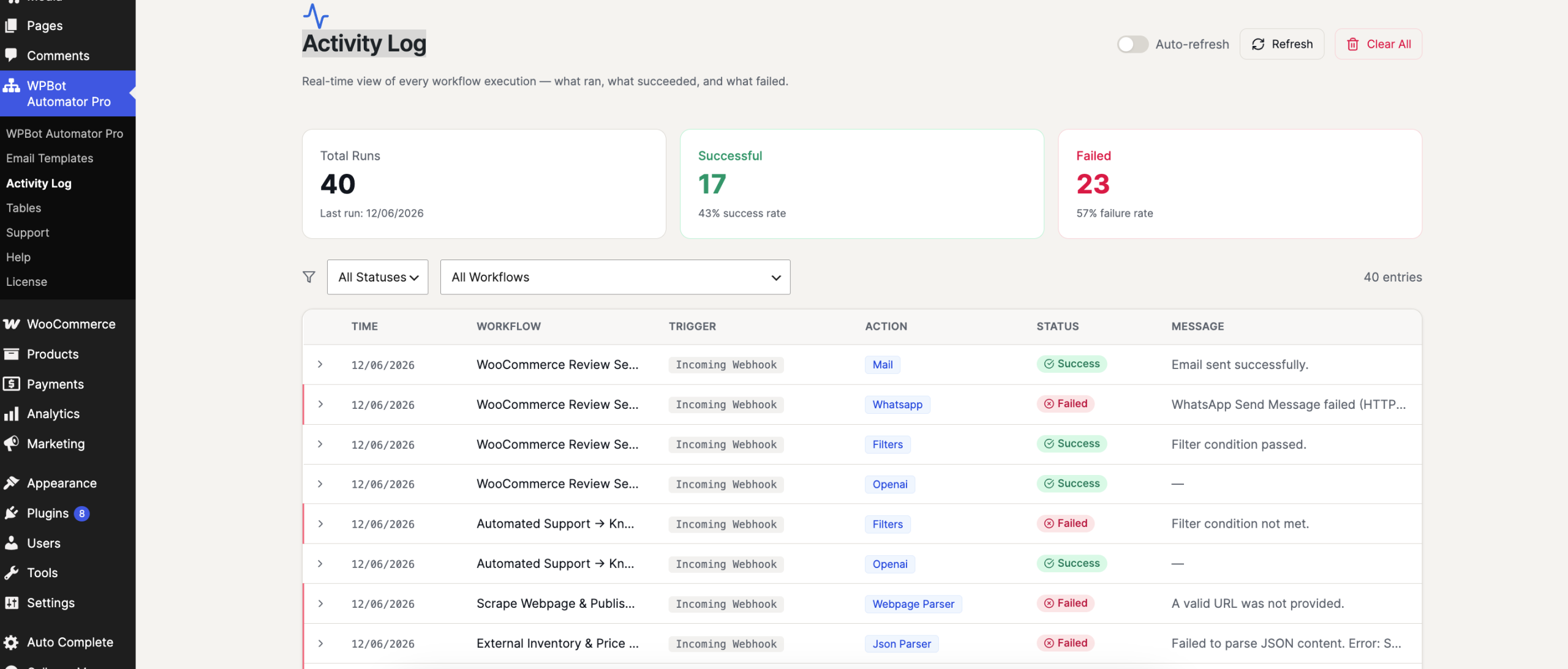
Workflow Execution History
View all workflow runs in a centralized log, including successful, failed, and pending executions.
Trigger Information
See which event triggered the workflow, such as:
- Form submissions
- WooCommerce orders
- User registrations
- Webhook requests
- Post publications
- Scheduled events
Action Results
Track the execution status of every workflow step and action.
Error Logs
Quickly identify failed actions and view error messages to troubleshoot workflow issues.
Execution Details
Review detailed information including:
- Workflow Name
- Trigger Event
- Execution Status
- Date and Time
- Processing Duration
- Error Messages
- Action Results
Benefits
Easy Troubleshooting
Identify and resolve workflow issues by reviewing detailed execution logs.
Workflow Monitoring
Monitor automation activity across your website and connected services.
Performance Tracking
Verify that workflows are executing successfully and efficiently.
Audit Trail
Maintain a complete record of automation activity for reporting and operational visibility.
The Activity Log gives you full visibility into your automation workflows, making it easy to monitor, debug, and manage your automated processes from a single location.








